
11 KiB
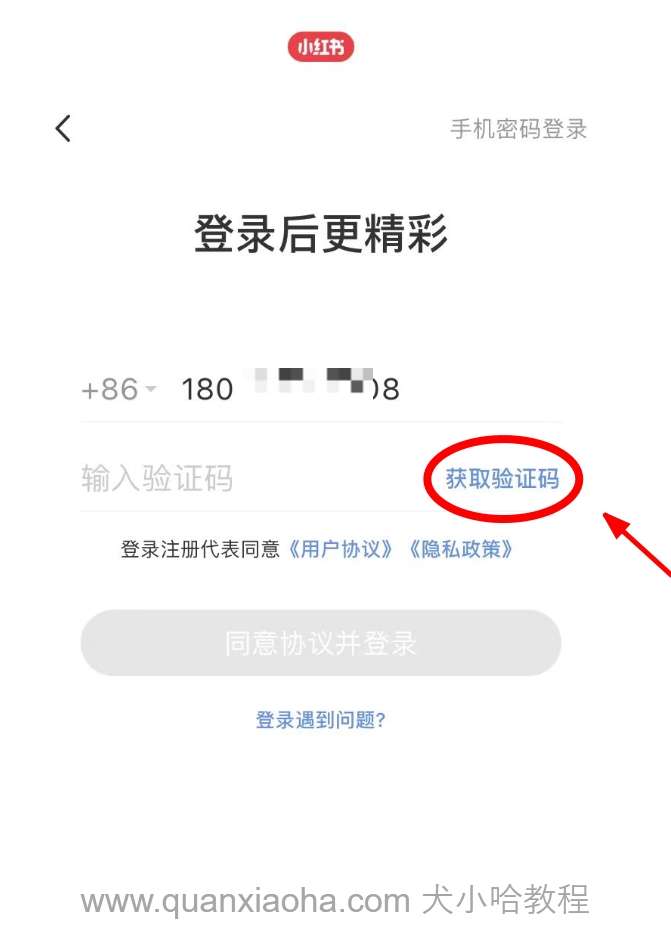
本小节中,正式进入到第一个业务接口的开发工作 —— 获取短信验证码接口。如下图所示,小红书是支持通过验证码来直接登录的:
业务逻辑设计
我们来分析一下该接口的业务逻辑要如何写?流程图如下:
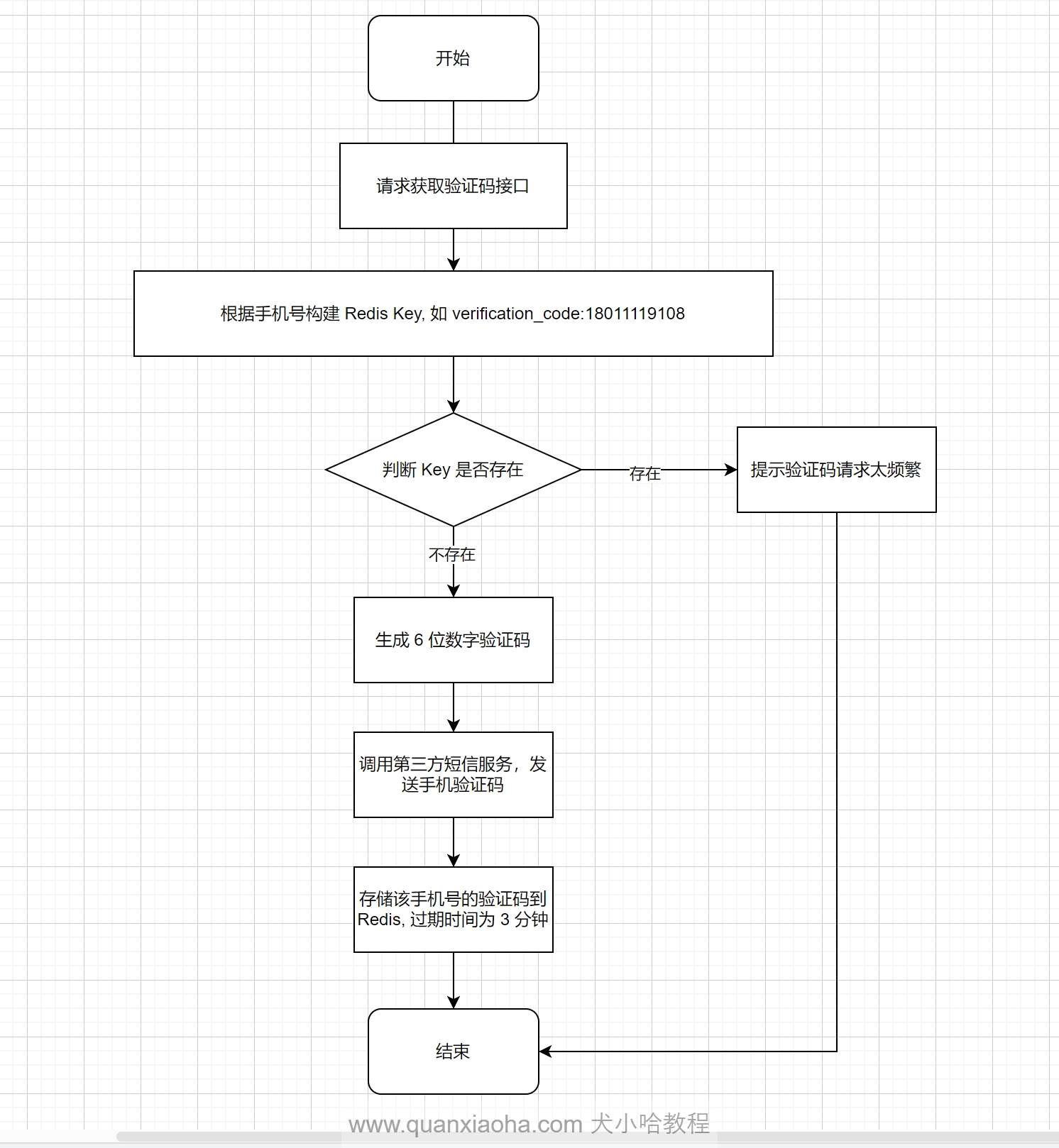
解释一波逻辑:
- 前端将手机号作为入参,请求获取短信验证码接口;
- 后端拿到手机号,根据手机号构建 Redis Key , 如
verification_code:18012349108;- 查询 Redis , 判断该 Key 值是否存在;
- 若已经存在,说明验证码还在有效期内(设置了3分钟有效期),并提示用户请求验证码太过频繁;
- 若不存在,则生成 6 位随机数字作为验证码;
- 调用第三方短信发送服务,比如阿里云的,将验证码发送到用户手机上;
- 同时,将该验证码存储到 Redis 中,过期时间为 3 分钟,用于后续用户点击登录时,判断填写的验证码和缓存中的是否一致,以及判断用户获取验证码是否太过频繁。
接口定义
业务逻辑设计完毕后,接下来,定义一下此接口的请求地址、入参,以及出参。
接口地址
POST /verification/code/send
入参
{
    "phone": "18019939108" // 手机号
}
出参
{
	"success": false,
	"message": "请求太频繁,请3分钟后再试",
	"errorCode": "AUTH-20000",
	"data": null
}
新建入参 VO
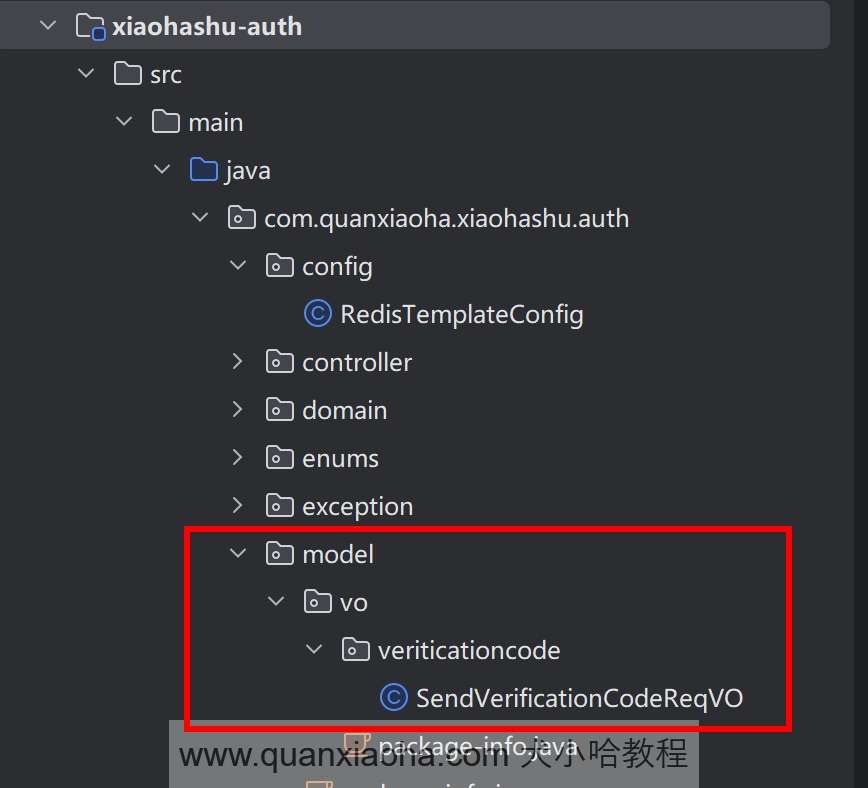
开始动手编码。编辑 xiaohashu-auth 认证服务,添加包 /model/vo/verificationcode , 并创建 SendVerificationCodeReqVO 入参实体类,代码如下:
package com.quanxiaoha.xiaohashu.auth.model.vo.verificationcode;

import jakarta.validation.constraints.NotBlank;
import lombok.AllArgsConstructor;
import lombok.Builder;
import lombok.Data;
import lombok.NoArgsConstructor;

@Data
@AllArgsConstructor
@NoArgsConstructor
@Builder
public class SendVerificationCodeReqVO {

    @NotBlank(message = "手机号不能为空")
    private String phone;

}
添加 guava、hutool、commons-lang3 工具
接着,编辑项目最外层的 pom.xml , 将一些比较流行的工具包依赖整合到项目中,如 guava 、hutool 、commongs-lang3 , 比如等会就将使用 hutool 快捷的生成 6 位数字验证码,代码如下:
    <properties>
		// 省略...

        <guava.version>33.0.0-jre</guava.version>
        <hutool.version>5.8.26</hutool.version>
        <commons-lang3.version>3.12.0</commons-lang3.version>
    </properties>

    <!-- 统一依赖管理 -->
    <dependencyManagement>
        <dependencies>
			// 省略...

            <!-- 相关工具类 -->
            <dependency>
                <groupId>com.google.guava</groupId>
                <artifactId>guava</artifactId>
                <version>${guava.version}</version>
            </dependency>

            <dependency>
                <groupId>cn.hutool</groupId>
                <artifactId>hutool-all</artifactId>
                <version>${hutool.version}</version>
            </dependency>

            <dependency>
                <groupId>org.apache.commons</groupId>
                <artifactId>commons-lang3</artifactId>
                <version>${commons-lang3.version}</version>
            </dependency>
        </dependencies>
    </dependencyManagement>

    // 省略...
版本号声明完毕后,编辑 xiaoha-common 模块的 pom.xml , 引入这些工具类:
    <dependencies>
		// 省略...

        <!-- 相关工具类 -->
        <dependency>
            <groupId>com.google.guava</groupId>
            <artifactId>guava</artifactId>
        </dependency>

        <dependency>
            <groupId>cn.hutool</groupId>
            <artifactId>hutool-all</artifactId>
        </dependency>

        <dependency>
            <groupId>org.apache.commons</groupId>
            <artifactId>commons-lang3</artifactId>
        </dependency>
    </dependencies>
添加完毕后,记得刷新一下 Maven, 将相关包下载到本地仓库中。
定义 Redis Key 常量类
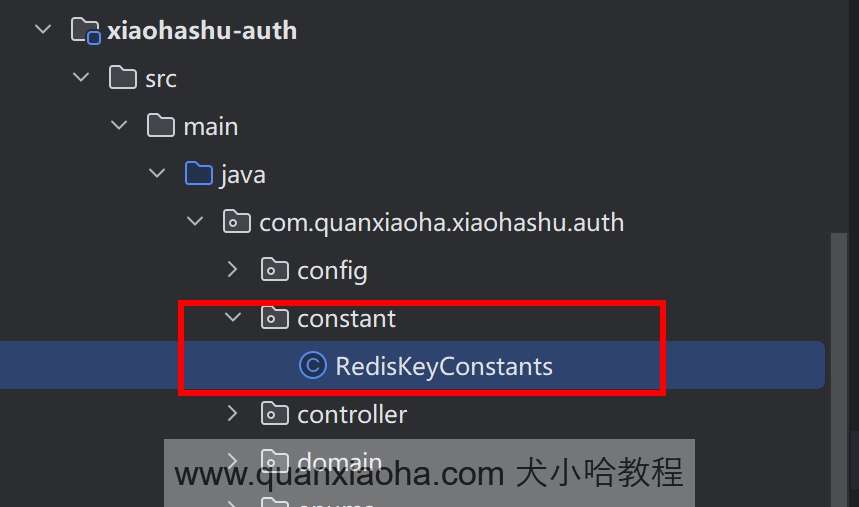
回到认证服务中,添加 /constant 常量类包,并创建 RedisKeyConstants 常量类,用于统一管理 Redis Key,代码如下:
package com.quanxiaoha.xiaohashu.auth.constant;

/**
 * @author: 犬小哈
 * @date: 2024/5/21 15:04
 * @version: v1.0.0
 * @description: TODO
 **/
public class RedisKeyConstants {

    /**
     * 验证码 KEY 前缀
     */
    private static final String VERIFICATION_CODE_KEY_PREFIX = "verification_code:";

    /**
     * 构建验证码 KEY
     * @param phone
     * @return
     */
    public static String buildVerificationCodeKey(String phone) {
        return VERIFICATION_CODE_KEY_PREFIX + phone;
    }
}
- 定义一个短信验证码
key的前缀:verification_code:;- 并封装一个拼接验证码完整
key的静态构建方法,入参为手机号,方便等会在业务层中便捷的生成key;
定义获取短信验证码频繁错误码
编辑 ResponseCodeEnum 全局错误枚举类,添加 请求太频繁,请3分钟后再试 对应的错误码枚举值,代码如下:
package com.quanxiaoha.xiaohashu.auth.enums;

import com.quanxiaoha.framework.common.exception.BaseExceptionInterface;
import lombok.AllArgsConstructor;
import lombok.Getter;

/**
 * @author: 犬小哈
 * @url: www.quanxiaoha.com
 * @date: 2023-08-15 10:33
 * @description: 响应异常码
 **/
@Getter
@AllArgsConstructor
public enum ResponseCodeEnum implements BaseExceptionInterface {

	// 省略...

    // ----------- 业务异常状态码 -----------
    VERIFICATION_CODE_SEND_FREQUENTLY("AUTH-20000", "请求太频繁,请3分钟后再试"),
    ;

    // 异常码
    private final String errorCode;
    // 错误信息
    private final String errorMessage;

}
编写 service 业务代码
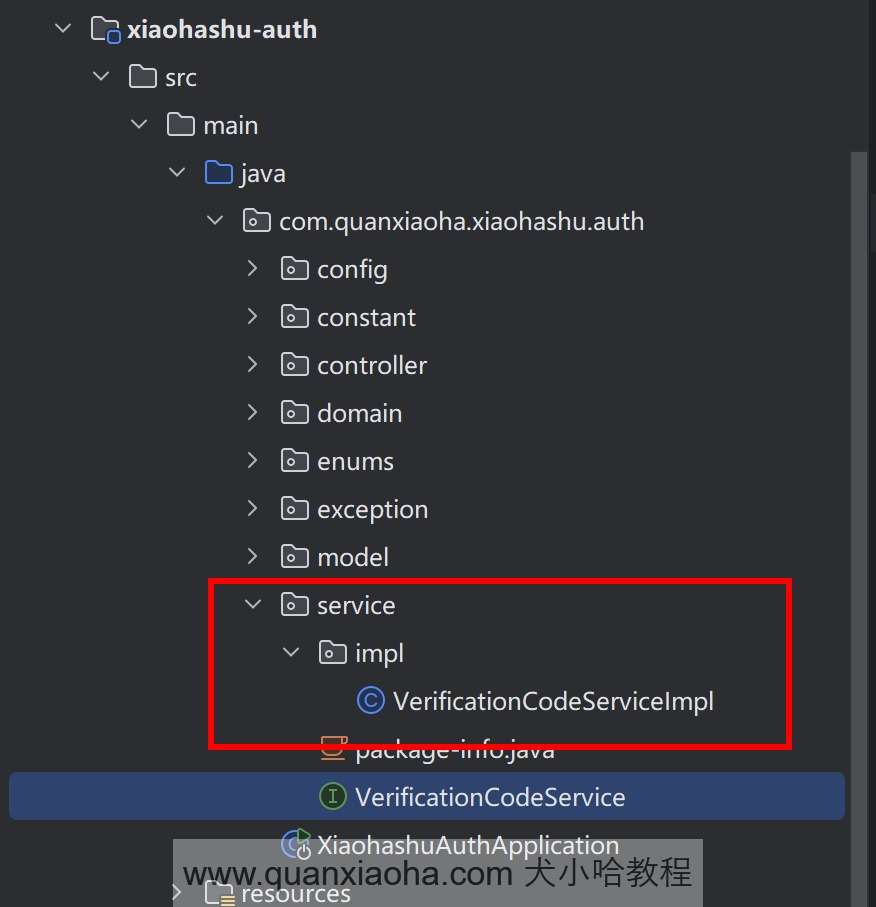
以上准备工作完成后,开始编写业务层代码。首先,添加 /service/impl 包,并创建 VerificationCodeService 业务接口,以及其实现类:
package com.quanxiaoha.xiaohashu.auth.service;

import com.quanxiaoha.framework.common.response.Response;
import com.quanxiaoha.xiaohashu.auth.model.vo.verificationcode.SendVerificationCodeReqVO;

public interface VerificationCodeService {

    /**
     * 发送短信验证码
     *
     * @param sendVerificationCodeReqVO
     * @return
     */
    Response<?> send(SendVerificationCodeReqVO sendVerificationCodeReqVO);
}
业务接口中定义一个发送短信验证码的方法。
package com.quanxiaoha.xiaohashu.auth.service.impl;

import cn.hutool.core.util.RandomUtil;
import com.quanxiaoha.framework.common.response.Response;
import com.quanxiaoha.xiaohashu.auth.constant.RedisKeyConstants;
import com.quanxiaoha.xiaohashu.auth.enums.ResponseCodeEnum;
import com.quanxiaoha.xiaohashu.auth.model.vo.verificationcode.SendVerificationCodeReqVO;
import com.quanxiaoha.xiaohashu.auth.service.VerificationCodeService;
import jakarta.annotation.Resource;
import lombok.extern.slf4j.Slf4j;
import org.springframework.data.redis.core.RedisTemplate;
import org.springframework.stereotype.Service;

import java.util.concurrent.TimeUnit;

@Service
@Slf4j
public class VerificationCodeServiceImpl implements VerificationCodeService {

    @Resource
    private RedisTemplate<String, Object> redisTemplate;

    /**
     * 发送短信验证码
     *
     * @param sendVerificationCodeReqVO
     * @return
     */
    @Override
    public Response<?> send(SendVerificationCodeReqVO sendVerificationCodeReqVO) {
        // 手机号
        String phone = sendVerificationCodeReqVO.getPhone();

        // 构建验证码 redis key
        String key = RedisKeyConstants.buildVerificationCodeKey(phone);

        // 判断是否已发送验证码
        boolean isSent = redisTemplate.hasKey(key);
        if (isSent) {
            // 若之前发送的验证码未过期,则提示发送频繁
            throw new BizException(ResponseCodeEnum.VERIFICATION_CODE_SEND_FREQUENTLY);
        }

        // 生成 6 位随机数字验证码
        String verificationCode = RandomUtil.randomNumbers(6);

        // todo: 调用第三方短信发送服务

        log.info("==> 手机号: {}, 已发送验证码:【{}】", phone, verificationCode);

        // 存储验证码到 redis, 并设置过期时间为 3 分钟
        redisTemplate.opsForValue().set(key, verificationCode, 3, TimeUnit.MINUTES);

        return Response.success();
    }
}
业务逻辑已经在文章开头说明过了,不再赘述。需要注意的是,调用第三方短信发送服务的逻辑,这里先写个
todo, 等后续小节中再单独讲解如何接入。
编写 controller 控制层
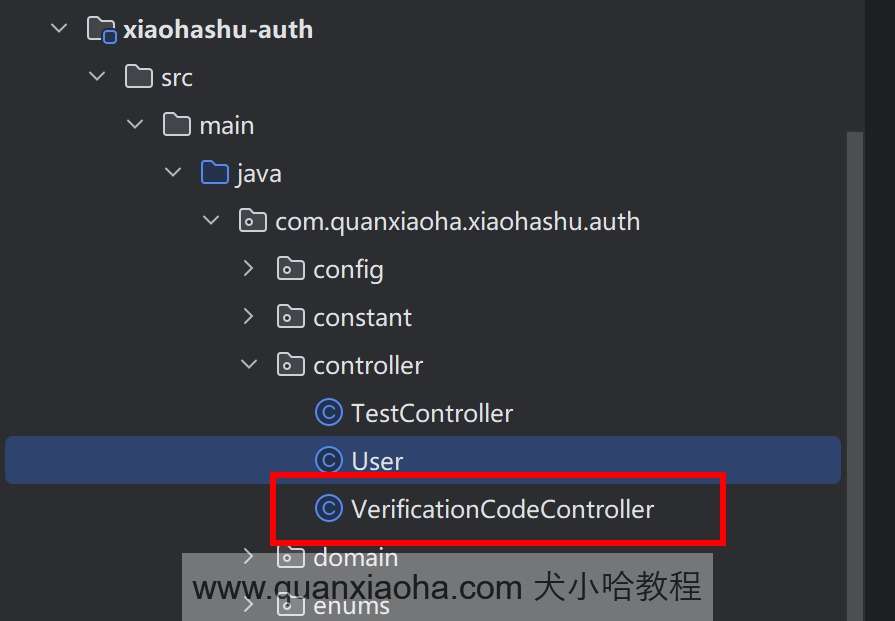
最后,创建 /controller 包,并添加 VerificationCodeController 控制器以及定义 /verification/code/send 接口,代码如下:
package com.quanxiaoha.xiaohashu.auth.controller;

import com.quanxiaoha.framework.biz.operationlog.aspect.ApiOperationLog;
import com.quanxiaoha.framework.common.response.Response;
import com.quanxiaoha.xiaohashu.auth.model.vo.verificationcode.SendVerificationCodeReqVO;
import com.quanxiaoha.xiaohashu.auth.service.VerificationCodeService;
import jakarta.annotation.Resource;
import lombok.extern.slf4j.Slf4j;
import org.springframework.validation.annotation.Validated;
import org.springframework.web.bind.annotation.PostMapping;
import org.springframework.web.bind.annotation.RequestBody;
import org.springframework.web.bind.annotation.RestController;


@RestController
@Slf4j
public class VerificationCodeController {

    @Resource
    private VerificationCodeService verificationCodeService;

    @PostMapping("/verification/code/send")
    @ApiOperationLog(description = "发送短信验证码")
    public Response<?> send(@Validated @RequestBody SendVerificationCodeReqVO sendVerificationCodeReqVO) {
        return verificationCodeService.send(sendVerificationCodeReqVO);
    }

}
自测一波
重启项目,通过 Apipost 工具来测试一下接口功能是否正常。如下图所示:
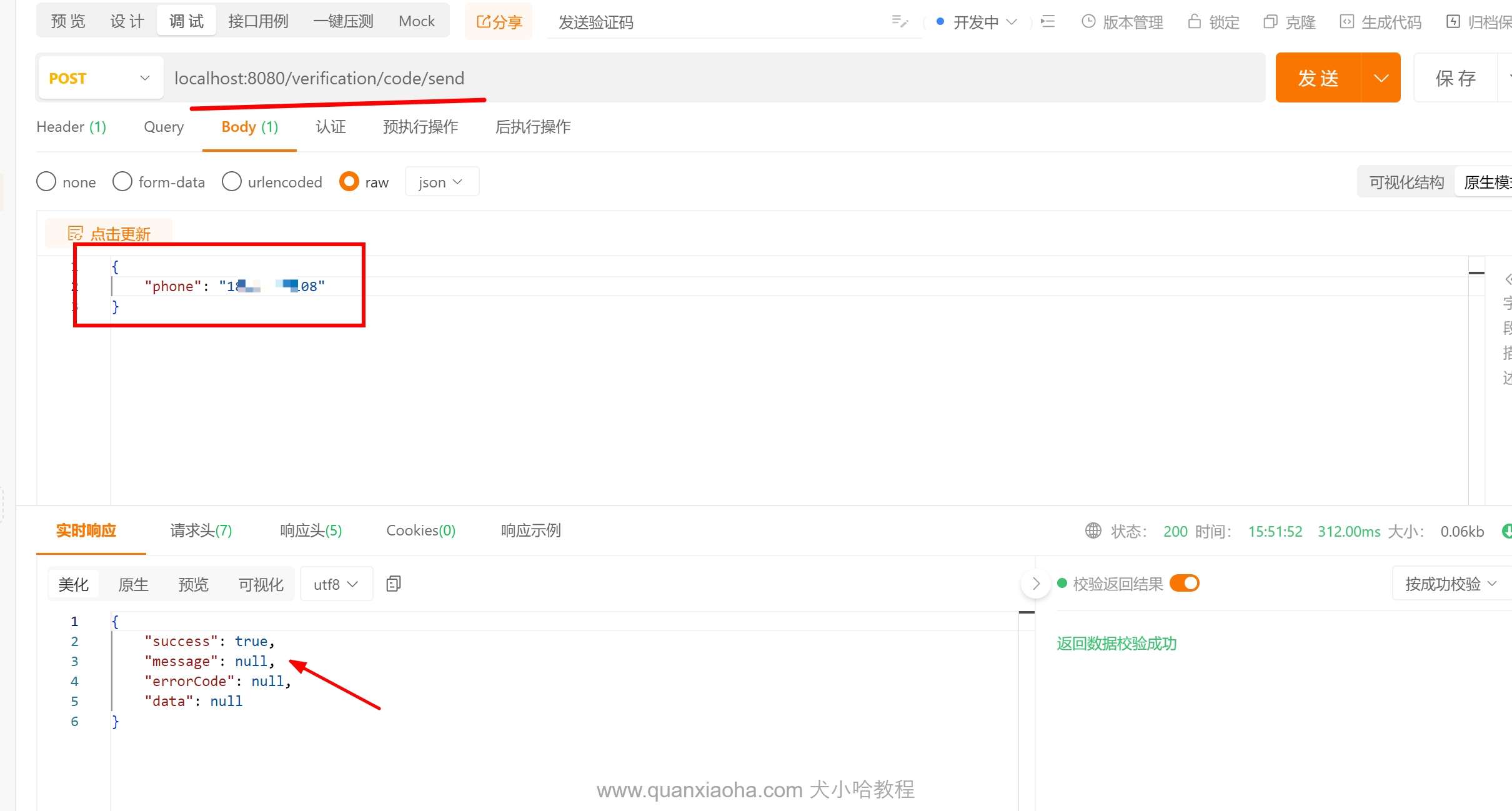
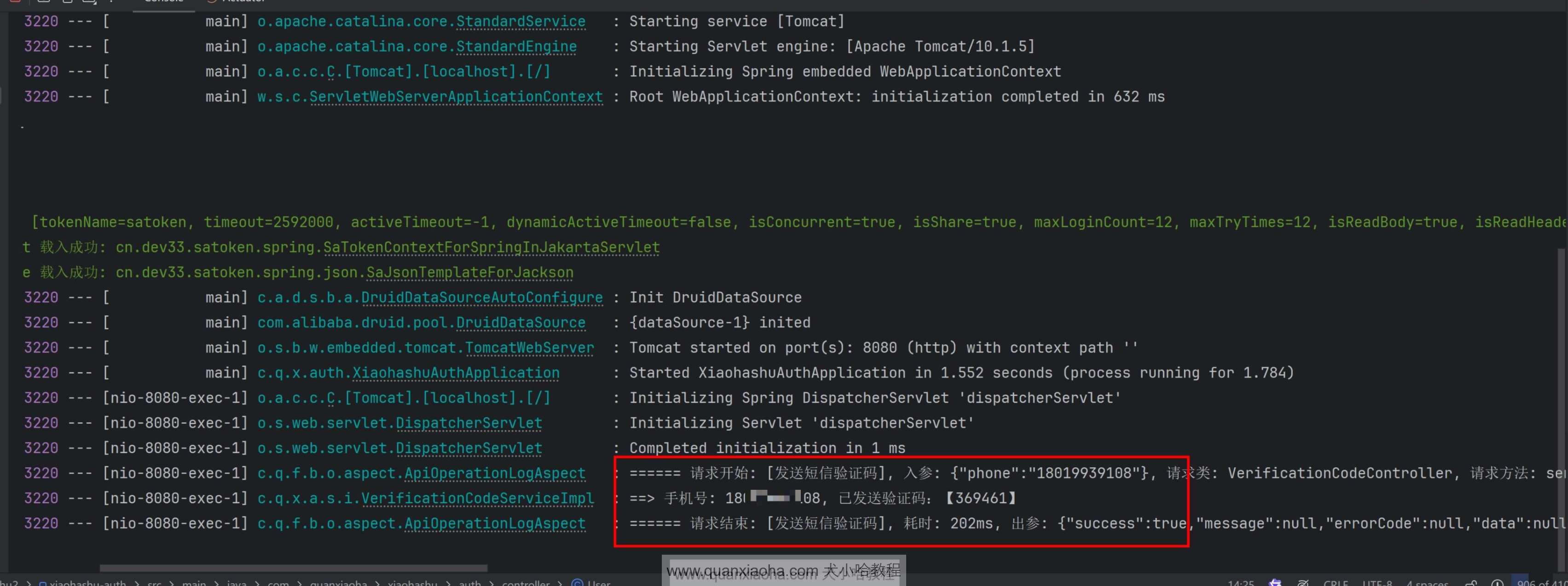
填写对应的手机号,点击发送按钮,可以看到响参提示 success 成功。再查看后台控制台日志,成功打印了生成了的验证码:
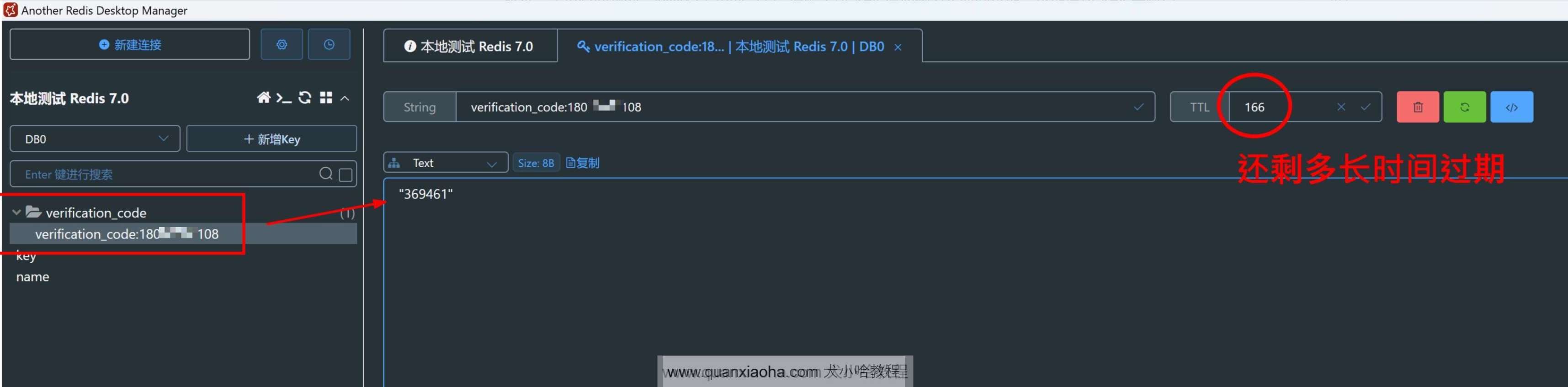
连接到 Redis 中,验证一下对应的 Key 是否存在,以及值是否和控制台日志中的验证码一样,如下图所示,是没有问题的,同时右上角的 ttl 值就是该 Key 值还剩多长时间过期,过期后该 Key 会被自动删除:
如果 Redis 中,该 Key 还未过期,再次请求获取验证码接口,也会正常提示【请求太频繁,请3分钟后再试】信息:

OK, 至此 ,获取手机短信验证码接口的大体逻辑,就开发完成啦~