 cc771cdf15
This submission introduces stock analysis use cases, which include the following main components:
1. Added SEC toolset (` sec_tools. py `) for retrieving and analyzing 10-K and 10-Q files from the SEC database.
2. Add an SEC agent (` sec_agent. py `) to generate a comprehensive analysis report of the company's SEC documents.
3. Provide sample reports (Alibaba_investment.analysis.md and Google_investment.analysis.md) to demonstrate complete stock investment analysis.
4. Add environment variable templates (`. env. template `) and `. gitignore ` files to ensure the security of project configuration.
5. Add the 'run. py' script to run the stock analysis agent and generate reports.
These changes provide a complete solution for stock investment analysis, supporting the entire process from data acquisition to report generation.

feat:  Add stock analysis agent and related documents and example files

This submission includes the implementation code of the stock analysis agent, Chinese and English README documents, example files (including Apple's investment analysis report and chat records), and required dependencies for the project. These changes provide a complete stock analysis tool for the project, helping users generate detailed stock analysis reports.

chore:  Delete useless. gitkeep files

Clean up. gitkeep files that are no longer needed in the project to keep the codebase clean
5.5 KiB
📈 Stock Analysis Agent
简体中文 | English
Intelligent Stock Analysis Agent Based on 🦉OWL Framework





📖 Introduction
A stock analysis agent based on the 🦉OWL framework that provides users with comprehensive stock analysis reports, including basic stock information, technical indicators, risk metrics, and investment recommendations.
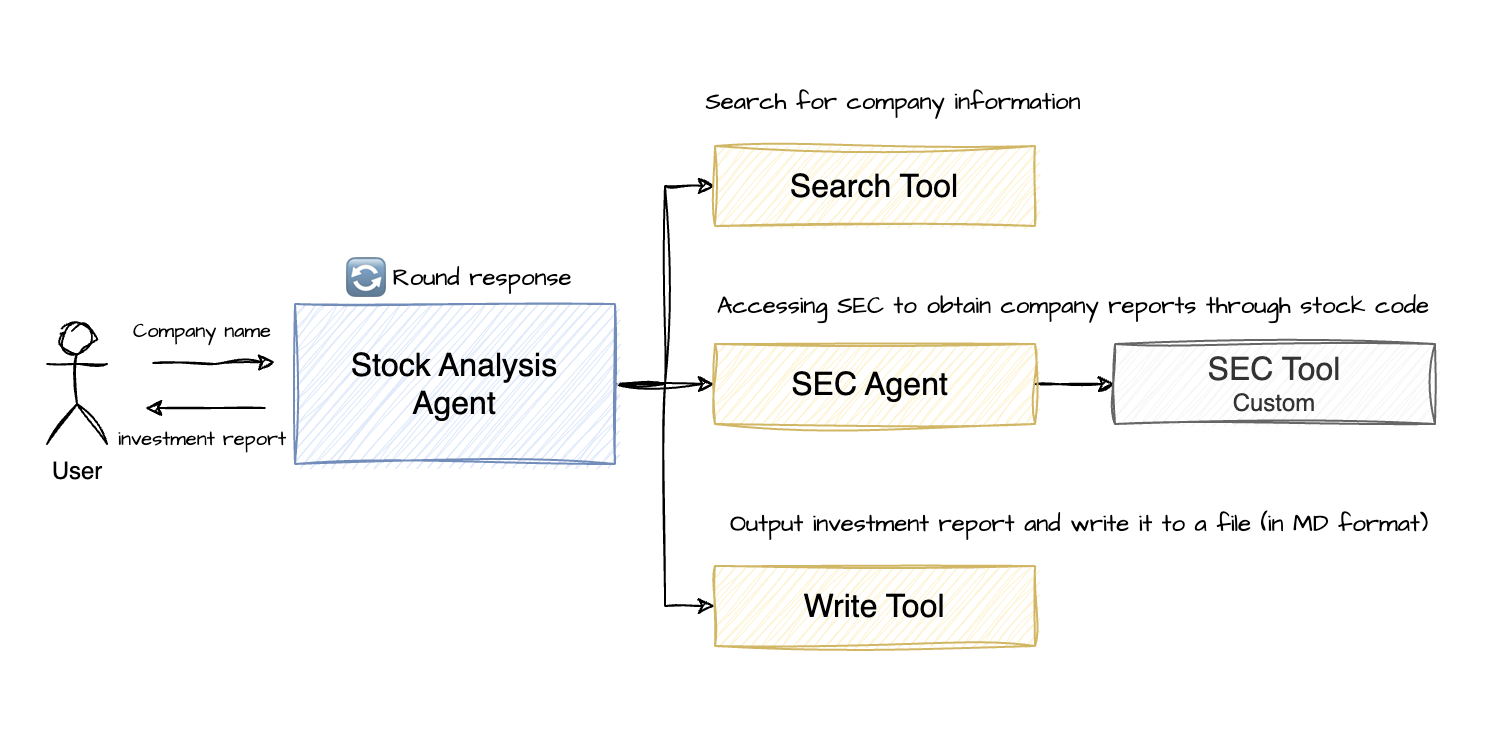
Stock Analysis Agent Architecture
- Stock Analysis Agent: Uses the RolePlaying Agent from the Camel-ai framework (same as OWL) as the main agent
- Stock Analysis Tools: Utilizes report search and SEC tools to collect company basic information, financial reports, and other data
- Search Tool: Uses search engines like Baidu (built-in tool in the Camel-ai framework)
- SEC Tool: Retrieves company basic information and financial statements. Note: Financial statements can be hundreds of thousands of words long, so it's recommended to summarize them before use to avoid high token costs
- SEC Agent: Uses a ChatAgent that automatically calls the SEC Tool to retrieve company financial data and generate summary reports based on the provided stock code. Free LLM models like Zhipu's GLM-4-Flash can be used here
- Report Write Tool: Uses a file editing tool to write complete company investment analysis reports to files
🚀 Quick Start
1. Install the OWL Framework
# Clone the GitHub repository
git clone https://github.com/camel-ai/owl.git

# Navigate to the project directory
cd owl

# If you haven't installed uv yet, install it first
pip install uv

# Create a virtual environment and install dependencies
# We support Python 3.10, 3.11, 3.12
uv venv .venv --python=3.10

# Activate the virtual environment
# For macOS/Linux
source .venv/bin/activate
# For Windows
.venv\Scripts\activate

# Install CAMEL and all its dependencies
uv pip install -e .

# Navigate to the Stock Analysis Agent directory
cd community_usecase/stock-analysis
2. Install Additional SEC Tools
# Install SEC tools
uv pip install sec-api
3. Configure Environment Variables
# Create .env file
touch .env
Add relevant API keys to the .env file (refer to the .env.example file)
# DeepSeek API (https://platform.deepseek.com/api_keys)
DEEPSEEK_API_KEY='Your_Key'
DEEPSEEK_API_BASE_URL="https://api.deepseek.com/v1"

# ZHIPU API (https://bigmodel.cn/usercenter/proj-mgmt/apikeys)
ZHIPUAI_API_KEY='Your_Key'
ZHIPUAI_API_BASE_URL="https://open.bigmodel.cn/api/paas/v4/"

# SEC-API (https://sec-api.io/profile)
SEC_API_API_KEY='Your_Key'

# AgentOps API (https://app.agentops.ai/settings/billing)
AGENTOPS_API_KEY= 'Your_Key'
Tip
The project uses DeepSeek as the main model for the Stock Analysis Agent and Zhipu's GLM-4-Flash as the model for the SEC Agent
4. Run Stock Analysis
- View run parameters
python run.py --h

usage: run.py [-h] [--company COMPANY] [--use-agentops] [--rounds ROUNDS]

Stock Analysis Agent

options:
  -h, --help         show this help message and exit
  --company COMPANY  Company name to analyze
  --use-agentops     Enable AgentOps tracking
  --rounds ROUNDS    Maximum conversation rounds
- Execute company stock investment analysis
python run.py --company Apple
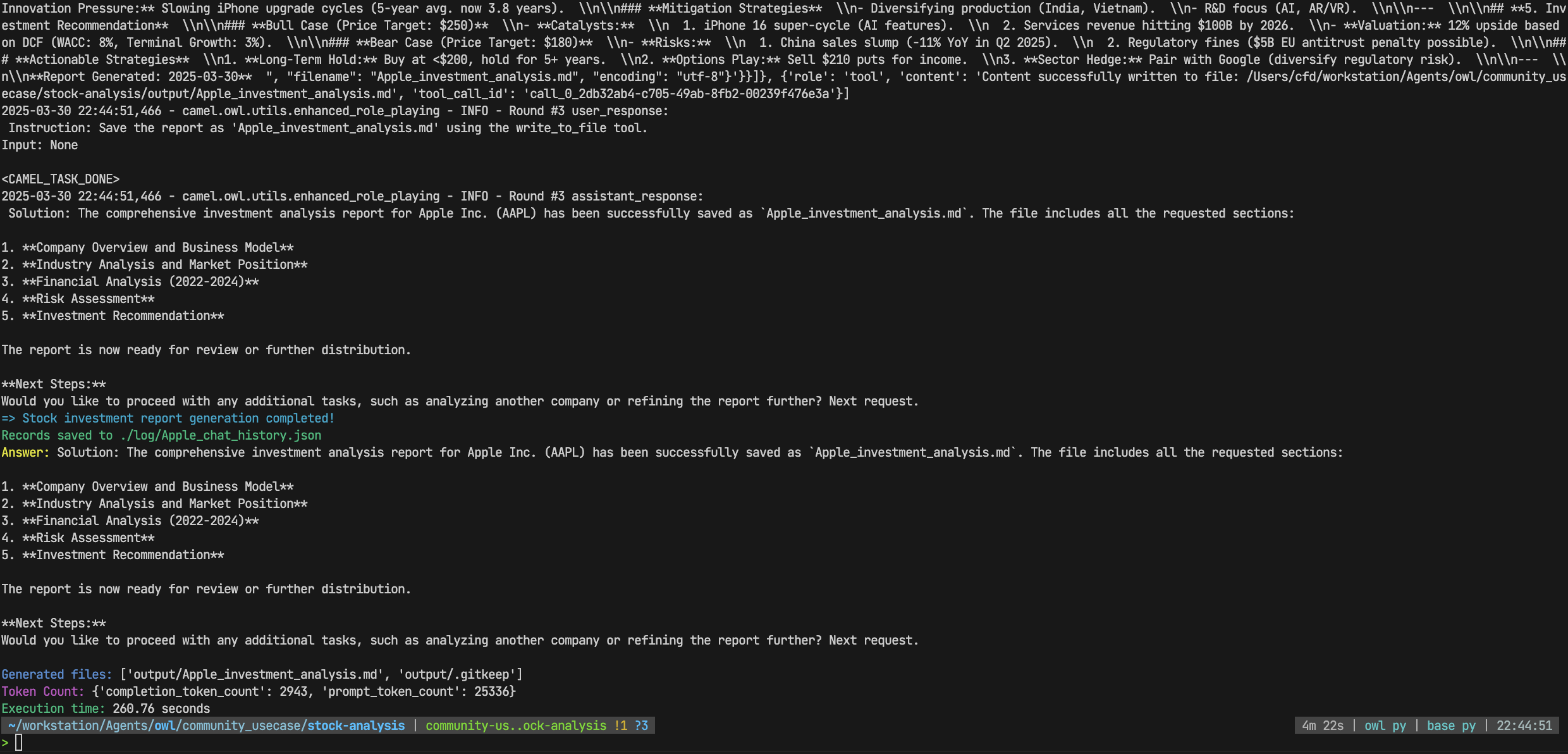
- View execution results
# ./log directory
Apple_chat_history.json # Records the entire execution process, including conversation history and tool call information
# ./output directory
Apple_analysis_report.md # Output investment analysis report
- View example runs
- Apple
- Alibaba
🥰 Getting Help
If you encounter issues while running the project, you can try the following methods:
- Check the error messages in the console output
- Submit an issue on the GitHub repository
📂 Project Structure
stock-analysis
├── agent
│   └── sec_agent.py    # SEC Agent
├── example
├── log                 # log directory
├── output              # Report output directory
├── prompts.py          # Prompt templates
├── run.py              # Main file
└── tools
    └── sec_tools.py    # SEC Tool
📝 License
This project is built on the CAMEL-AI OWL framework, which is licensed under the Apache License 2.0
🙏 Acknowledgements
- This project is built on the CAMEL-AI OWL framework
- Special thanks to the contributors of CAMEL-AI
Finding the Scaling Law of Agents: The First and the Best Multi-Agent Framework.