mirror of
https://github.com/camel-ai/owl.git
synced 2026-03-22 14:07:17 +08:00

387 lines
13 KiB
Markdown
387 lines
13 KiB
Markdown
<h1 align="center">
|
||
🦉 OWL: Optimized Workforce Learning for General Multi-Agent Assistance in Real-World Task Automation
|
||
</h1>
|
||
|
||
|
||
<div align="center">
|
||
|
||
[![Documentation][docs-image]][docs-url]
|
||
[![Discord][discord-image]][discord-url]
|
||
[![X][x-image]][x-url]
|
||
[![Reddit][reddit-image]][reddit-url]
|
||
[![Wechat][wechat-image]][wechat-url]
|
||
[![Wechat][owl-image]][owl-url]
|
||
[![Hugging Face][huggingface-image]][huggingface-url]
|
||
[![Star][star-image]][star-url]
|
||
[![Package License][package-license-image]][package-license-url]
|
||
|
||
|
||
</div>
|
||
|
||
|
||
<hr>
|
||
|
||
<div align="center">
|
||
<h4 align="center">
|
||
|
||
[中文阅读](https://github.com/camel-ai/owl/tree/main/README_zh.md) |
|
||
[Community](https://github.com/camel-ai/owl#community) |
|
||
[Installation](#️-installation) |
|
||
[Examples](https://github.com/camel-ai/owl/tree/main/owl) |
|
||
[Paper](https://arxiv.org/abs/2303.17760) |
|
||
[Citation](https://github.com/camel-ai/owl#citation) |
|
||
[Contributing](https://github.com/camel-ai/owl/graphs/contributors) |
|
||
[CAMEL-AI](https://www.camel-ai.org/)
|
||
|
||
</h4>
|
||
|
||
<div align="center" style="background-color: #f0f7ff; padding: 10px; border-radius: 5px; margin: 15px 0;">
|
||
<h3 style="color: #1e88e5; margin: 0;">
|
||
🏆 OWL achieves <span style="color: #d81b60; font-weight: bold; font-size: 1.2em;">58.18</span> average score on GAIA benchmark and ranks <span style="color: #d81b60; font-weight: bold; font-size: 1.2em;">🏅️ #1</span> among open-source frameworks! 🏆
|
||
</h3>
|
||
</div>
|
||
|
||
<div align="center">
|
||
|
||
🦉 OWL is a cutting-edge framework for multi-agent collaboration that pushes the boundaries of task automation, built on top of the [CAMEL-AI Framework](https://github.com/camel-ai/camel).
|
||
|
||
<!-- OWL achieves **58.18** average score on [GAIA](https://huggingface.co/spaces/gaia-benchmark/leaderboard) benchmark and ranks 🏅️ #1 among open-source frameworks. -->
|
||
|
||
Our vision is to revolutionize how AI agents collaborate to solve real-world tasks. By leveraging dynamic agent interactions, OWL enables more natural, efficient, and robust task automation across diverse domains.
|
||
|
||
</div>
|
||
|
||

|
||
|
||
<br>
|
||
|
||
|
||
</div>
|
||
|
||
<!-- # Key Features -->
|
||
# 📋 Table of Contents
|
||
|
||
- [📋 Table of Contents](#-table-of-contents)
|
||
- [🔥 News](#-news)
|
||
- [🎬 Demo Video](#-demo-video)
|
||
- [✨️ Core Features](#-core-features)
|
||
- [🛠️ Installation](#️-installation)
|
||
- [**Clone the Github repository**](#clone-the-github-repository)
|
||
- [**Set up Environment**](#set-up-environment)
|
||
- [**Install Dependencies**](#install-dependencies)
|
||
- [**Setup Environment Variables**](#setup-environment-variables)
|
||
- [**Running with Docker**](#running-with-docker)
|
||
|
||
- [🚀 Quick Start](#-quick-start)
|
||
- [🌐 Web Interface](#-web-interface)
|
||
- [🧪 Experiments](#-experiments)
|
||
- [⏱️ Future Plans](#️-future-plans)
|
||
- [📄 License](#-license)
|
||
- [🖊️ Cite](#️-cite)
|
||
- [🔥 Community](#-community)
|
||
- [❓ FAQ](#-faq)
|
||
- [⭐ Star History](#-star-history)
|
||
|
||
|
||
# 🔥 News
|
||
|
||
- **[2025.03.07]**: We open-source the codebase of 🦉 OWL project.
|
||
|
||
# 🎬 Demo Video
|
||
|
||
https://github.com/user-attachments/assets/2a2a825d-39ea-45c5-9ba1-f9d58efbc372
|
||
|
||
https://private-user-images.githubusercontent.com/55657767/420212194-e813fc05-136a-485f-8df3-f10d9b4e63ec.mp4
|
||
|
||
# ✨️ Core Features
|
||
|
||
- **Real-time Information Retrieval**: Leverage Wikipedia, Google Search, and other online sources for up-to-date information.
|
||
- **Multimodal Processing**: Support for handling internet or local videos, images, and audio data.
|
||
- **Browser Automation**: Utilize the Playwright framework for simulating browser interactions, including scrolling, clicking, input handling, downloading, navigation, and more.
|
||
- **Document Parsing**: Extract content from Word, Excel, PDF, and PowerPoint files, converting them into text or Markdown format.
|
||
- **Code Execution**: Write and execute Python code using interpreter.
|
||
- **Built-in Toolkits**: Access to a comprehensive set of built-in toolkits including ArxivToolkit, AudioAnalysisToolkit, CodeExecutionToolkit, DalleToolkit, DataCommonsToolkit, ExcelToolkit, GitHubToolkit, GoogleMapsToolkit, GoogleScholarToolkit, ImageAnalysisToolkit, MathToolkit, NetworkXToolkit, NotionToolkit, OpenAPIToolkit, RedditToolkit, SearchToolkit, SemanticScholarToolkit, SymPyToolkit, VideoAnalysisToolkit, WeatherToolkit, WebToolkit, and many more for specialized tasks.
|
||
|
||
# 🛠️ Installation
|
||
|
||
## Option 1: Using uv (Recommended)
|
||
|
||
```bash
|
||
# Clone github repo
|
||
git clone https://github.com/camel-ai/owl.git
|
||
|
||
# Change directory into project directory
|
||
cd owl
|
||
|
||
# Install uv if you don't have it already
|
||
pip install uv
|
||
|
||
# Create a virtual environment and install dependencies
|
||
# We support using Python 3.10, 3.11, 3.12
|
||
uv venv .venv --python=3.10
|
||
|
||
# Activate the virtual environment
|
||
# For macOS/Linux
|
||
source .venv/bin/activate
|
||
# For Windows
|
||
.venv\Scripts\activate
|
||
|
||
# Install CAMEL with all dependencies
|
||
uv pip install -e .
|
||
|
||
# Exit the virtual environment when done
|
||
deactivate
|
||
```
|
||
|
||
## Option 2: Using venv and pip
|
||
|
||
```bash
|
||
# Clone github repo
|
||
git clone https://github.com/camel-ai/owl.git
|
||
|
||
# Change directory into project directory
|
||
cd owl
|
||
|
||
# Create a virtual environment
|
||
# For Python 3.10 (also works with 3.11, 3.12)
|
||
python3.10 -m venv .venv
|
||
|
||
# Activate the virtual environment
|
||
# For macOS/Linux
|
||
source .venv/bin/activate
|
||
# For Windows
|
||
.venv\Scripts\activate
|
||
|
||
# Install from requirements.txt
|
||
pip install -r requirements.txt
|
||
```
|
||
|
||
## Option 3: Using conda
|
||
|
||
```bash
|
||
# Clone github repo
|
||
git clone https://github.com/camel-ai/owl.git
|
||
|
||
# Change directory into project directory
|
||
cd owl
|
||
|
||
# Create a conda environment
|
||
conda create -n owl python=3.10
|
||
|
||
# Activate the conda environment
|
||
conda activate owl
|
||
|
||
# Option 1: Install as a package (recommended)
|
||
pip install -e .
|
||
|
||
# Option 2: Install from requirements.txt
|
||
pip install -r requirements.txt
|
||
|
||
# Exit the conda environment when done
|
||
conda deactivate
|
||
```
|
||
|
||
## **Setup Environment Variables**
|
||
|
||
In the `owl/.env_template` file, you will find all the necessary API keys along with the websites where you can register for each service. To use these API services, follow these steps:
|
||
|
||
1. *Copy and Rename*: Duplicate the `.env_template` file and rename the copy to `.env`.
|
||
```bash
|
||
cp owl/.env_template .env
|
||
```
|
||
2. *Fill in Your Keys*: Open the `.env` file and insert your API keys in the corresponding fields. (For the minimal example (`run_mini.py`), you only need to configure the LLM API key (e.g., OPENAI_API_KEY).)
|
||
3. *For using more other models*: please refer to our CAMEL models docs:https://docs.camel-ai.org/key_modules/models.html#supported-model-platforms-in-camel
|
||
|
||
|
||
> **Note**: For optimal performance, we strongly recommend using OpenAI models. Our experiments show that other models may result in significantly lower performance on complex tasks and benchmarks.
|
||
|
||
## **Running with Docker**
|
||
|
||
```bash
|
||
# Clone the repository
|
||
git clone https://github.com/camel-ai/owl.git
|
||
cd owl
|
||
|
||
# Configure environment variables
|
||
cp owl/.env_template owl/.env
|
||
# Edit the .env file and fill in your API keys
|
||
|
||
|
||
# Option 1: Using docker-compose directly
|
||
cd .container
|
||
docker-compose up -d
|
||
# Run OWL inside the container
|
||
docker-compose exec owl bash -c "xvfb-python run.py"
|
||
|
||
# Option 2: Build and run using the provided scripts
|
||
cd .container
|
||
chmod +x build_docker.sh
|
||
./build_docker.sh
|
||
# Run OWL inside the container
|
||
./run_in_docker.sh "your question"
|
||
```
|
||
|
||
For more detailed Docker usage instructions, including cross-platform support, optimized configurations, and troubleshooting, please refer to [DOCKER_README.md](.container/DOCKER_README_en.md).
|
||
|
||
# 🚀 Quick Start
|
||
|
||
|
||
|
||
Run the following demo case:
|
||
|
||
```bash
|
||
python owl/run.py
|
||
```
|
||
|
||
## Running with Different Models
|
||
|
||
OWL supports various LLM backends. You can use the following scripts to run with different models:
|
||
|
||
```bash
|
||
# Run with Qwen model
|
||
python owl/run_qwen.py
|
||
|
||
# Run with Deepseek model
|
||
python owl/run_deepseek.py
|
||
|
||
# Run with other OpenAI-compatible models
|
||
python owl/run_openai_compatiable_model.py
|
||
```
|
||
|
||
For a simpler version that only requires an LLM API key, you can try our minimal example:
|
||
|
||
```bash
|
||
python owl/run_mini.py
|
||
```
|
||
|
||
You can run OWL agent with your own task by modifying the `run.py` script:
|
||
|
||
```python
|
||
# Define your own task
|
||
question = "Task description here."
|
||
|
||
society = construct_society(question)
|
||
answer, chat_history, token_count = run_society(society)
|
||
|
||
print(f"\033[94mAnswer: {answer}\033[0m")
|
||
```
|
||
|
||
For uploading files, simply provide the file path along with your question:
|
||
|
||
```python
|
||
# Task with a local file (e.g., file path: `tmp/example.docx`)
|
||
question = "What is in the given DOCX file? Here is the file path: tmp/example.docx"
|
||
|
||
society = construct_society(question)
|
||
answer, chat_history, token_count = run_society(society)
|
||
print(f"\033[94mAnswer: {answer}\033[0m")
|
||
```
|
||
|
||
OWL will then automatically invoke document-related tools to process the file and extract the answer.
|
||
|
||
|
||
Example tasks you can try:
|
||
- "Find the latest stock price for Apple Inc."
|
||
- "Analyze the sentiment of recent tweets about climate change"
|
||
- "Help me debug this Python code: [your code here]"
|
||
- "Summarize the main points from this research paper: [paper URL]"
|
||
|
||
# 🌐 Web Interface
|
||
|
||
OWL now includes a web-based user interface that makes it easier to interact with the system. To start the web interface, run:
|
||
|
||
```bash
|
||
python run_app.py
|
||
```
|
||
|
||
The web interface provides the following features:
|
||
|
||
- **Easy Model Selection**: Choose between different models (OpenAI, Qwen, DeepSeek, etc.)
|
||
- **Environment Variable Management**: Configure your API keys and other settings directly from the UI
|
||
- **Interactive Chat Interface**: Communicate with OWL agents through a user-friendly interface
|
||
- **Task History**: View the history and results of your interactions
|
||
|
||
The web interface is built using Gradio and runs locally on your machine. No data is sent to external servers beyond what's required for the model API calls you configure.
|
||
|
||
# 🧪 Experiments
|
||
|
||
To reproduce OWL's GAIA benchmark score of 58.18:
|
||
|
||
1. Switch to the `gaia58.18` branch:
|
||
```bash
|
||
git checkout gaia58.18
|
||
```
|
||
|
||
1. Run the evaluation script:
|
||
```bash
|
||
python run_gaia_roleplaying.py
|
||
```
|
||
|
||
# ⏱️ Future Plans
|
||
|
||
- [ ] Write a technical blog post detailing our exploration and insights in multi-agent collaboration in real-world tasks.
|
||
- [ ] Enhance the toolkit ecosystem with more specialized tools for domain-specific tasks.
|
||
- [ ] Develop more sophisticated agent interaction patterns and communication protocols
|
||
|
||
|
||
# 📄 License
|
||
|
||
The source code is licensed under Apache 2.0.
|
||
|
||
# 🖊️ Cite
|
||
|
||
If you find this repo useful, please cite:
|
||
|
||
|
||
```
|
||
@misc{owl2025,
|
||
title = {OWL: Optimized Workforce Learning for General Multi-Agent Assistance in Real-World Task Automation},
|
||
author = {{CAMEL-AI.org}},
|
||
howpublished = {\url{https://github.com/camel-ai/owl}},
|
||
note = {Accessed: 2025-03-07},
|
||
year = {2025}
|
||
}
|
||
```
|
||
|
||
# 🔥 Community
|
||
Join us for further discussions!
|
||
<!--  -->
|
||

|
||
<!--  -->
|
||
|
||
# ❓ FAQ
|
||
|
||
**Q: Why don't I see Chrome running locally after starting the example script?**
|
||
|
||
A: If OWL determines that a task can be completed using non-browser tools (such as search or code execution), the browser will not be launched. The browser window will only appear when OWL determines that browser-based interaction is necessary.
|
||
|
||
# ⭐ Star History
|
||
|
||
[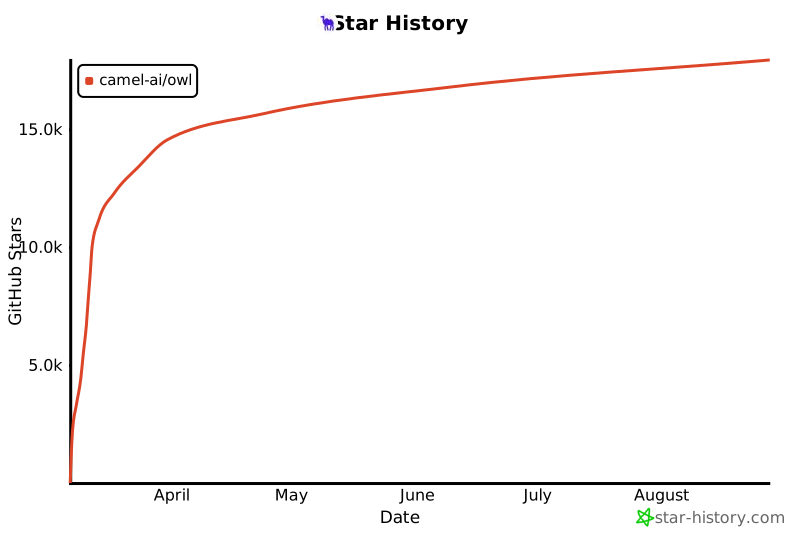](https://star-history.com/#camel-ai/owl&Date)
|
||
|
||
|
||
|
||
[docs-image]: https://img.shields.io/badge/Documentation-EB3ECC
|
||
[docs-url]: https://camel-ai.github.io/camel/index.html
|
||
[star-image]: https://img.shields.io/github/stars/camel-ai/owl?label=stars&logo=github&color=brightgreen
|
||
[star-url]: https://github.com/camel-ai/owl/stargazers
|
||
[package-license-image]: https://img.shields.io/badge/License-Apache_2.0-blue.svg
|
||
[package-license-url]: https://github.com/camel-ai/owl/blob/main/licenses/LICENSE
|
||
|
||
[colab-url]: https://colab.research.google.com/drive/1AzP33O8rnMW__7ocWJhVBXjKziJXPtim?usp=sharing
|
||
[colab-image]: https://colab.research.google.com/assets/colab-badge.svg
|
||
[huggingface-url]: https://huggingface.co/camel-ai
|
||
[huggingface-image]: https://img.shields.io/badge/%F0%9F%A4%97%20Hugging%20Face-CAMEL--AI-ffc107?color=ffc107&logoColor=white
|
||
[discord-url]: https://discord.camel-ai.org/
|
||
[discord-image]: https://img.shields.io/discord/1082486657678311454?logo=discord&labelColor=%20%235462eb&logoColor=%20%23f5f5f5&color=%20%235462eb
|
||
[wechat-url]: https://ghli.org/camel/wechat.png
|
||
[wechat-image]: https://img.shields.io/badge/WeChat-CamelAIOrg-brightgreen?logo=wechat&logoColor=white
|
||
[x-url]: https://x.com/CamelAIOrg
|
||
[x-image]: https://img.shields.io/twitter/follow/CamelAIOrg?style=social
|
||
[twitter-image]: https://img.shields.io/twitter/follow/CamelAIOrg?style=social&color=brightgreen&logo=twitter
|
||
[reddit-url]: https://www.reddit.com/r/CamelAI/
|
||
[reddit-image]: https://img.shields.io/reddit/subreddit-subscribers/CamelAI?style=plastic&logo=reddit&label=r%2FCAMEL&labelColor=white
|
||
[ambassador-url]: https://www.camel-ai.org/community
|
||
[owl-url]: ./assets/qr_code.jpg
|
||
[owl-image]: https://img.shields.io/badge/WeChat-OWLProject-brightgreen?logo=wechat&logoColor=white
|