mirror of
https://github.com/camel-ai/owl.git
synced 2026-03-22 05:57:17 +08:00
 89d1d9905c
Fix link and tag errors in README.md and README-zh.md to ensure that file paths and tag names are consistent
5.2 KiB
5.2 KiB
📈 Stock Analysis Agent
简体中文 | English
基于🦉OWL框架的股票分析的智能体





📖 功能介绍
基于 🦉OWL 框架的股票分析的智能体,通过对股票的分析,为用户提供股票的分析报告,包括股票的基本信息、股票的技术指标、股票的风险指标、股票的投资建议等。
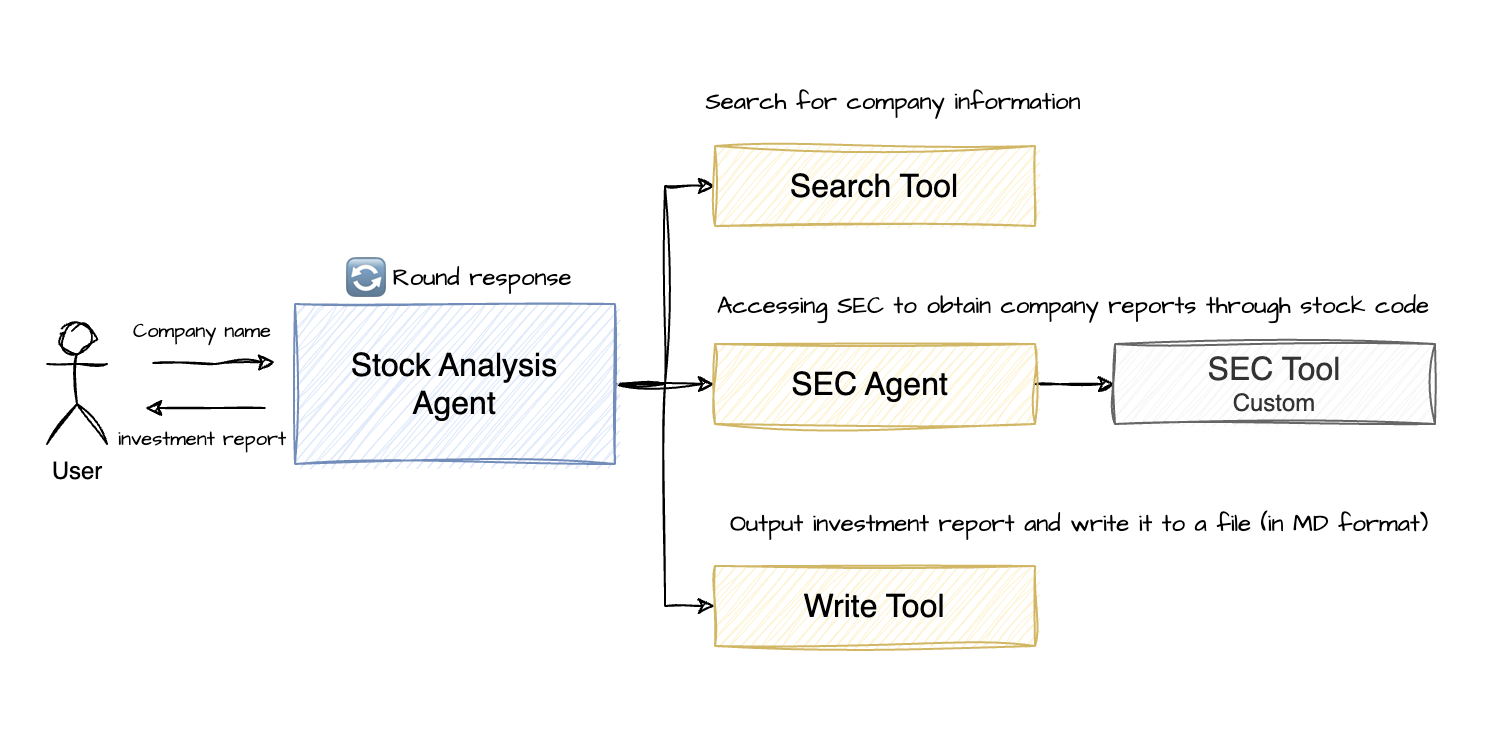
Stock Analysis Agent 架构图
- Stock Analysis Agent: 使用使用 Camel-ai 框架中的 RolePlaying Agent(同 OWL 一样)作为主智能体
- Stock Analysis Tool:使用报告搜索、SEC 工具收集公司基本信息、财务报告等信息
- Search Tool:使用如百度搜索等搜索引擎工具(Camel-ai 框架自带工具)
- SEC Tool:使用 SEC 工具获取公司基本信息、财务报表等信息。注意:获取的公司财务报表会有几十万字,建议先总结再使用,否则会有高昂的 Token 费用
- SEC Agent:这里使用了 ChatAgent,通过给定公司股票代码自动调用 SEC Tool 工具获取公司财务报表数据并生成总结报告。这里可以使用免费的 LLM 模型,如智谱的 GLM-4-Flash 模型
- Report Write Tool:使用文件编辑工具,将完整的公司投资分析报告写入文件
🚀 快速开始
1. 安装 OWL 框架
# 克隆 GitHub 仓库
git clone https://github.com/camel-ai/owl.git

# 进入项目目录
cd owl

# 如果你还没有安装 uv,请先安装
pip install uv

# 创建虚拟环境并安装依赖
# 我们支持使用 Python 3.10、3.11、3.12
uv venv .venv --python=3.10

# 激活虚拟环境
# 对于 macOS/Linux
source .venv/bin/activate
# 对于 Windows
.venv\Scripts\activate

# 安装 CAMEL 及其所有依赖
uv pip install -e .

# 进入Stock Analysis Agent目录
cd community_usecase/stock-analysis
2. 安装额外的 SEC 工具
# 安装 SEC 工具
uv pip install sec-api
3. 配置环境变量
# 创建 .env 文件
touch .env
添加相关 API keys 到 .env 文件 (可以参考 .env.example 文件)
# DeepSeek API (https://platform.deepseek.com/api_keys)
DEEPSEEK_API_KEY='Your_Key'
DEEPSEEK_API_BASE_URL="https://api.deepseek.com/v1"

# ZHIPU API (https://bigmodel.cn/usercenter/proj-mgmt/apikeys)
ZHIPUAI_API_KEY='Your_Key'
ZHIPUAI_API_BASE_URL="https://open.bigmodel.cn/api/paas/v4/"

# SEC-API (https://sec-api.io/profile)
SEC_API_API_KEY='Your_Key'

# AgentOps API (https://app.agentops.ai/settings/billing)
AGENTOPS_API_KEY= 'Your_Key'
Tip
项目使用 DeepSeek 作为 Stock Analysis Agent 的主模型,使用智谱的 GLM-4-Flash 作为 SEC Agent 的模型
4. 运行 Stock Analysis
- 查看运行参数
python run.py --h

usage: run.py [-h] [--company COMPANY] [--use-agentops] [--rounds ROUNDS]

Stock Analysis Agent

options:
  -h, --help         show this help message and exit
  --company COMPANY  Company name to analyze
  --use-agentops     Enable AgentOps tracking
  --rounds ROUNDS    Maximum conversation rounds
- 执行公司股票投资分析
python run.py --company Apple
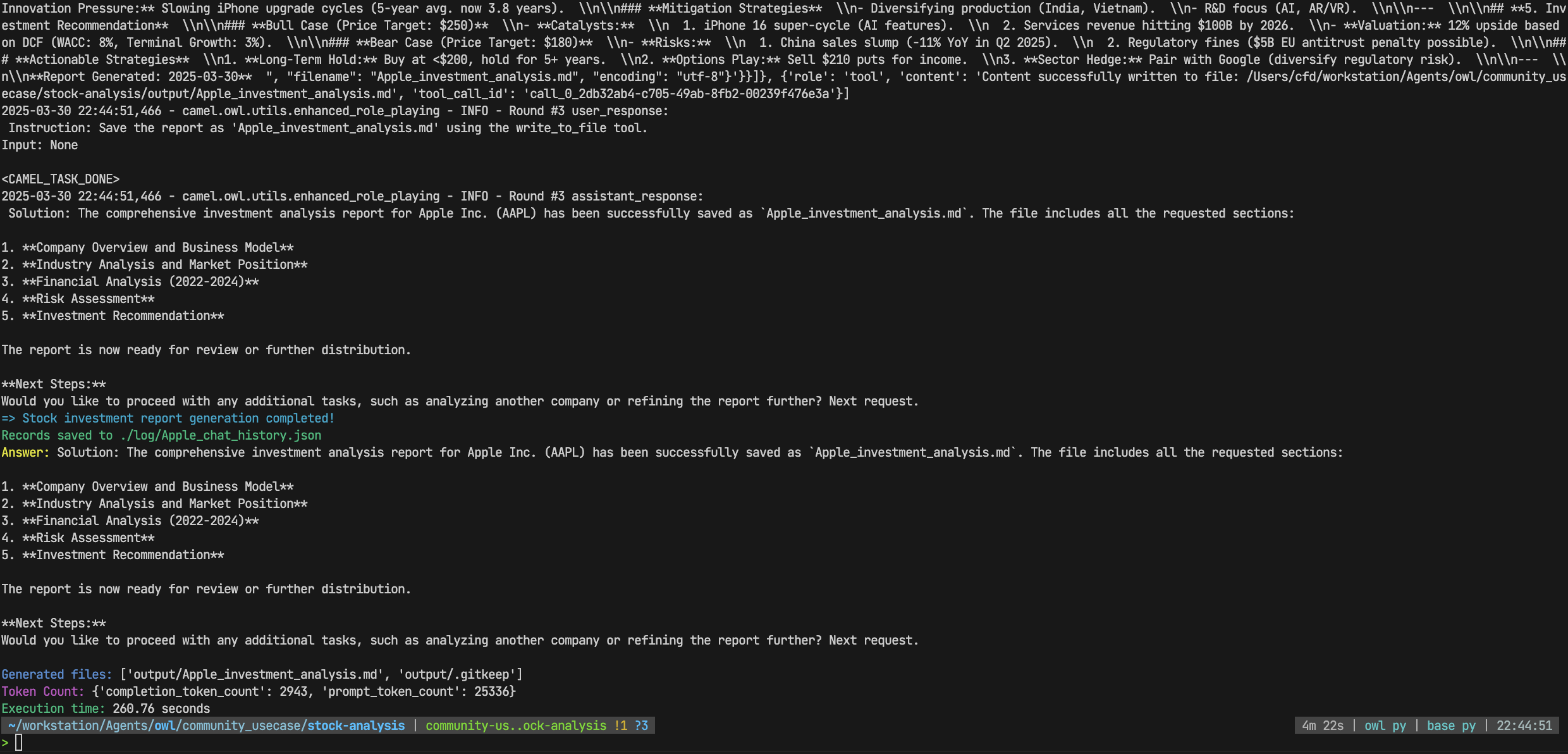
- 查看运行结果
# ./log 目录
Apple_chat_history.json #记录整个执行过程,包括对话记录和工具调用信息等
# ./output 目录
Apple_analysis_report.md #输出的投资分析报告
- 查看运行案例
- Apple
- Alibaba
🥰 获取帮助
如果您在运行中发现问题,可以尝试以下方法:
- 查看控制台输出的错误信息
- 在 GitHub 仓库上提交 issue
📂 项目结构
stock-analysis
├── agent
│   └── sec_agent.py    # SEC Agent
├── example
├── log                 # log directory
├── output              # Report output directory
├── prompts.py          # Prompt templates
├── run.py              # Main file
└── tools
    └── sec_tools.py    # SEC Tool
📝 License
本项目基于 CAMEL-AI OWL 框架构建,该框架许可是Apache License 2.0
🙏 致谢
-该项目基于CAMEL-AI OWL 框架构建 -特别感谢 CAMEL-AI 的贡献者
Finding the Scaling Law of Agents: The First and the Best Multi-Agent Framework.