mirror of
https://github.com/chaos-zhu/easynode.git
synced 2026-10-07 17:08:29 +08:00

139 lines
4.0 KiB
Markdown
139 lines
4.0 KiB
Markdown
# EasyNode
|
|
|
|
> 一个简易的个人Linux服务器管理面板(基于Node.js)
|
|
|
|
## 功能
|
|
|
|
> 多服务器管理; 通过`websocker实时更新`服务器基本信息: **系统、公网IP、CPU、内存、硬盘、网卡**等
|
|
|
|

|
|
|
|
> 基于浏览器解决`SSH跨端同步`问题——**Web SSH**
|
|
|
|

|
|
|
|
## 安装指南
|
|
|
|
### 服务端安装
|
|
|
|
- 依赖Node.js环境
|
|
|
|
- 占用端口:8082(http端口)、8083(https端口)、22022(客户端端口)
|
|
|
|
- 建议使用**境外服务器**(最好延迟低)安装服务端,客户端信息监控与webssh功能都将以`该服务器作为跳板机`
|
|
|
|
- https服务需自行配置证书,或者使用`nginx反代`解决(推荐)
|
|
|
|
#### Docker镜像
|
|
|
|
> 注意:网速统计功能可能受限,预计v2.0版本切换方案
|
|
|
|
```shell
|
|
docker run -d -p 8082:8082 -p 22022:22022 chaoszhu/easynode
|
|
```
|
|
|
|
访问:http://yourip:8082
|
|
|
|
#### 一键脚本
|
|
|
|
- 依赖Linux基础命令:curl wget git zip tar;如未安装请先安装:
|
|
|
|
> ubuntu/debian: apt install curl wget git zip tar -y
|
|
>
|
|
> centos: yum install curl wget git zip tar -y
|
|
|
|
```shell
|
|
wget -qO- --no-check-certificate https://ghproxy.com/https://raw.githubusercontent.com/chaos-zhu/easynode/master/easynode-server-install.sh | bash
|
|
```
|
|
|
|
访问:http://yourip:8082
|
|
|
|
- 查看日志:`pm2 log easynode-server`
|
|
- 启动服务:`pm2 start easynode-server`
|
|
- 停止服务:`pm2 stop easynode-server`
|
|
- 停止服务:`pm2 delete easynode-server`
|
|
|
|
#### 手动部署
|
|
|
|
1. 安装Node.js
|
|
2. 安装pm2、安装yarn
|
|
3. 拉取代码:git clone https://github.com/chaos-zhu/easynode.git
|
|
4. 安装依赖:yarn
|
|
5. 启动服务:pm2 start server/app/main.js --name easynode-server
|
|
6. 访问:http://yourip:8082
|
|
|
|
- 默认登录密码:admin(首次部署完成后请及时修改).
|
|
|
|
6. 部署https服务
|
|
- 部署https服务需要自己上传域名证书至`\server\app\config\pem`,并且证书和私钥分别命名:`key.pem`和`cert.pem`
|
|
- 配置域名:vim server/app/config/index.js 在domain字段中填写你解析到服务器的域名
|
|
- pm2 restart easynode-server
|
|
- 不出意外你就可以访问https服务:https://domain:8083
|
|
|
|
---
|
|
|
|
### 客户端安装
|
|
|
|
- 占用端口:22022
|
|
|
|
#### X86架构
|
|
```shell
|
|
wget -qO- --no-check-certificate https://ghproxy.com/https://raw.githubusercontent.com/chaos-zhu/easynode/master/easynode-client-install-x86.sh | bash
|
|
```
|
|
#### ARM架构
|
|
```shell
|
|
wget -qO- --no-check-certificate https://ghproxy.com/https://raw.githubusercontent.com/chaos-zhu/easynode/master/easynode-client-install-arm.sh | bash
|
|
```
|
|
|
|
> 卸载:无服务残留
|
|
|
|
```shell
|
|
wget -qO- --no-check-certificate https://ghproxy.com/https://raw.githubusercontent.com/chaos-zhu/easynode/master/easynode-client-uninstall.sh | bash
|
|
```
|
|
|
|
> 查看客户端状态:`systemctl status easynode-client`
|
|
>
|
|
> 查看客户端日志: `journalctl --follow -u easynode-client`
|
|
>
|
|
> 查看详细日志:journalctl -xe
|
|
|
|
---
|
|
|
|
## 安全与说明
|
|
|
|
> 本人非专业后端,此服务全凭兴趣开发. 由于知识受限,并不能保证没有漏洞的存在,生产服务器请慎重使用此服务.
|
|
|
|
> 所有服务器信息相关接口已做`jwt鉴权`
|
|
|
|
> webssh功能需要的密钥信息全部保存在服务端服务器的`app\config\storage\ssh-record.json`中. 在保存ssh密钥信息到服务器时,v1.0版本未做加密,`如果使用此功能最好带上https`, 并且保管好你的服务端服务器密码.
|
|
|
|
## 技术架构
|
|
|
|
> 待更新...
|
|
|
|
## v2.0功能方向
|
|
|
|
- http传输加密
|
|
|
|
- 终端快捷键
|
|
|
|
- 终端常用指令
|
|
|
|
- 终端多tab支持
|
|
|
|
- 终端主题
|
|
|
|
- FTP文件系统
|
|
|
|
- 支持完整功能的docker镜像
|
|
|
|
## 感谢
|
|
|
|
[](https://github.com/chaos-zhu/easynode/stargazers)
|
|
|
|
[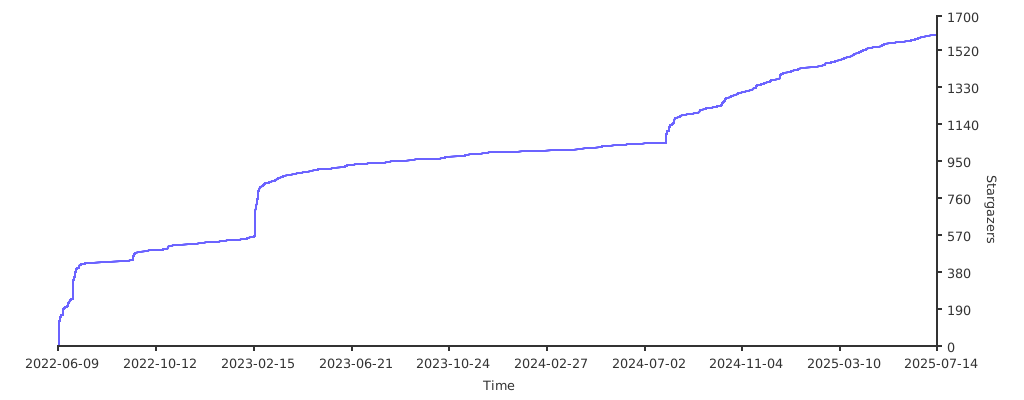](https://starchart.cc/chaos-zhu/easynode)
|
|
|
|
## License
|
|
|
|
[MIT](LICENSE). Copyright (c).
|