 Tim O'Farrellandopenhands
cfa2ba5796
Tim O'Farrellandopenhands
cfa2ba5796
The Manage Backends modal previously rendered pencil and trash icons on
every backend row even when the deployment was started with
--lock-to-cloud. In locked mode the user should not be able to mutate
the locked backend's host/key/name or remove it outright.

backend-row.tsx now consults getLockedCloudHost() and skips rendering
both action buttons when a locked cloud host is configured. The row
identity (name + host) still renders so the user can see which backend
is locked.

Adds three focused tests to describe("BackendRow", ...):

  * renders edit and remove buttons when not locked to a cloud host
  * hides edit and remove buttons when locked via VITE_LOCK_TO_CLOUD
  * hides edit and remove buttons when locked via the
    window.__AGENT_CANVAS_LOCK_TO_CLOUD__ runtime global

Also extends afterEach with vi.unstubAllEnvs + window-global cleanup
(consistent with backend-form-modal.test.tsx) and isolates three
pre-existing edit-form tests from a local .env that sets
VITE_LOCK_TO_CLOUD, so they keep exercising edit-form behavior rather
than lock behavior.

Co-authored-by: openhands <openhands@all-hands.dev>

Agent Canvas
The self-hosted developer control center for coding agents and automations.
Run OpenHands, Claude Code, Codex, Gemini, or any ACP-compatible agent across local, remote, and cloud backends.





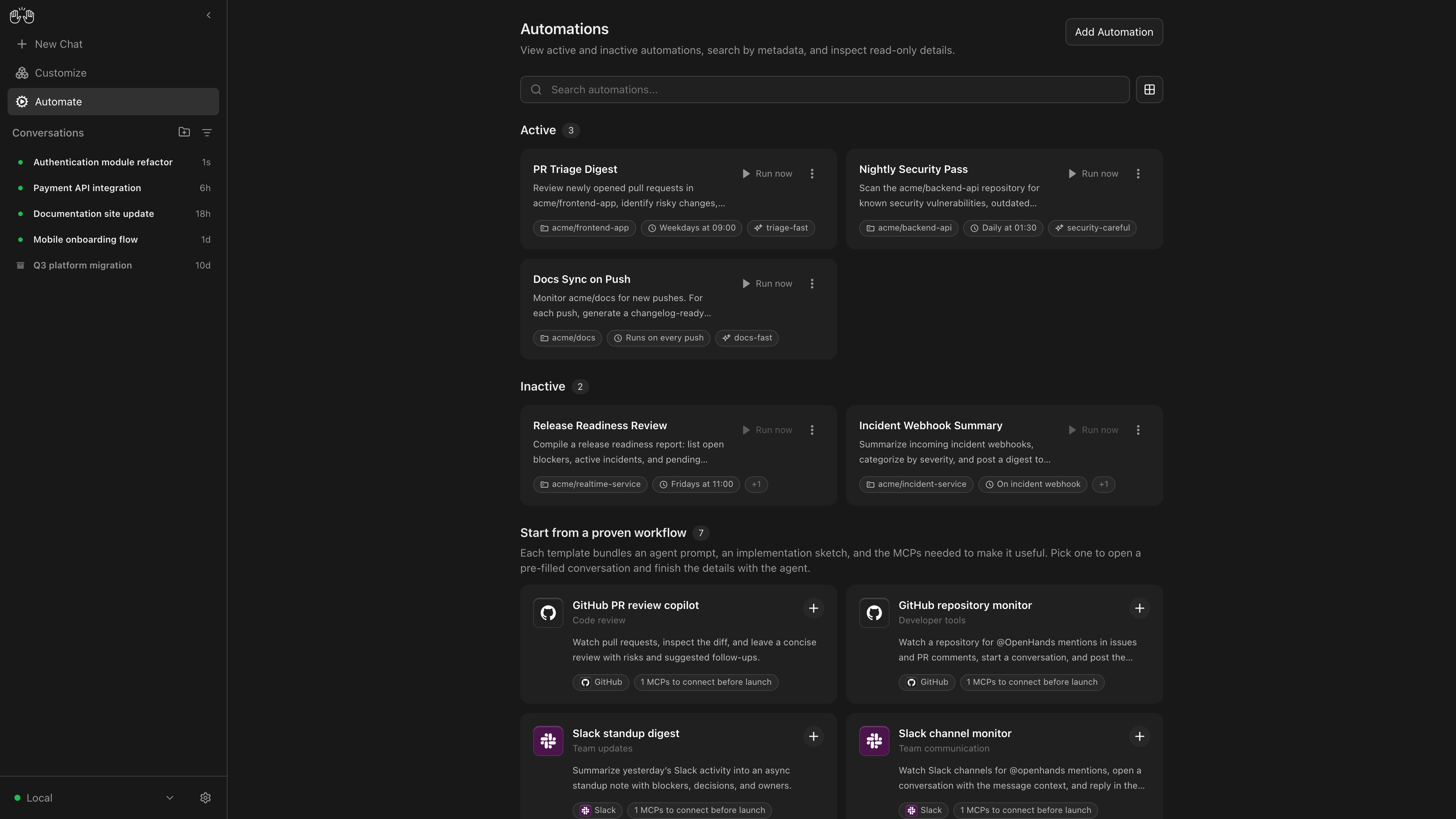
OpenHands Agent Canvas turns your coding agents into a self-hosted, always-on engineering team. It's a developer control center for starting conversations and automating everyday tasks — like generating reports that publish to Slack or automatically decomposing GitHub issues into tasks.
It runs locally on your machine by default, but can connect to multiple “agent backends”, e.g. running agents in Docker containers, on VMs, or within your company infrastructure. You can optionally choose to run agents on OpenHands Cloud or OpenHands Enterprise infrastructure.
Agent Canvas runs the open source OpenHands agent out-of-the-box, but can use any third-party agent like Claude Code and Codex.
| Self-host your way | Run agents locally, in Docker, on VMs, or anywhere you can run an agent server backend |
| Switch between different backends | Switch between local, remote, and cloud agents without losing focus |
| Create automations | Create automations and workflows that integrate with Slack, GitHub, Linear, and more. Run on a schedule or in response to webhook events |
| Integrate with the tools you use | Connect your automations with third-party services like Slack, GitHub, Notion, and more to automate workflows |
| Bring your own model | Use with any LLM |
| Use with any agent | Use with OpenHands, Claude Code, Codex, Gemini, or any agent with Agent-Client Protocol (ACP). |
If you have questions or feedback, please open a GitHub issue or join the #proj-agent-canvas channel in Slack.
Quickstart
You can install OpenHands to run agents on any machine: on your laptop, on a dedicated computer like a Mac Mini, or on a server in the cloud.
The most powerful way to run OpenHands is on a server in the cloud. This allows your agents to continue running even when your laptop is shut, and makes it easier to trigger your agents through third-party services like Slack, GitHub, and Datadog. See SELF_HOSTING.md for details, especially with respect to security hardening.
Notably, you can run the backend in multiple different environments, and switch between them from the same Agent Canvas frontend. E.g. you can share an Agent Server with your team for agents doing code review and dependency updates, then have your personal agents running on your laptop.
Option 1: Without a Sandbox
Warning
This runs the agent-server directly on the machine you're installing on — the agent will have full access to your filesystem!
Prerequisites: Node.js 22.12.x or later, uv
npm install -g @openhands/agent-canvas
agent-canvas
The agent-canvas command starts the full local stack by default. You can also split it when you want to run pieces separately:
agent-canvas --frontend-only  # static frontend + ingress only
agent-canvas --backend-only   # agent server + automation backend + ingress only
Option 2: With a Docker Sandbox
Prerequisites:
- Docker: Docker Desktop on macOS/Windows, or Docker Engine/Docker Desktop on Linux.
- A host directory for
PROJECTS_PATHcontaining the project folders you want the agent to access. Create it before starting the container.
macOS / Linux:
export PROJECTS_PATH="$HOME/projects"  # directory containing your project folders
mkdir -p "$PROJECTS_PATH" "$HOME/.openhands"

docker run -it --rm \
  -p 8000:8000 \
  -v "$HOME/.openhands:/home/openhands/.openhands" \
  -v "${PROJECTS_PATH}:/projects" \
  ghcr.io/openhands/agent-canvas:1.1.0
Windows (PowerShell / Windows Terminal): See README.windows.md for the equivalent commands.
The agent will be able to access any project under PROJECTS_PATH.
Option 3: From Source
Warning
This runs the agent-server directly on the machine you're installing on — the agent will have full access to your filesystem!
Prerequisites: Node.js 22.12.x or later, npm, uv (for running the agent server via uvx)
git clone https://github.com/OpenHands/agent-canvas.git
cd agent-canvas
npm install
npm run dev
Access the UI at http://localhost:8000. You can add additional backends directly from the UI.
Architecture
Agent Canvas is powered by the OpenHands Agent Server, a REST API for running multiple agents on a single machine. Each Agent Server runs on a single host/port; the Agent Canvas can connect to multiple Agent Servers and easily flip between them.
You can run an Agent Server anywhere:
- Directly on your laptop (be careful!)
- On a dedicated machine like a Mac Mini
- On a virtual machine in the cloud
- Inside OpenHands Cloud (our commercial offering)
The Agent Server is often paired with an Automation Server, which lets you set up agents that run on a schedule or in response to events.