 b2ba5889d3
* fix(examples): inherit acp-docker image from config/defaults.json

examples/acp-docker/docker-compose.yml hardcoded the agent-server image at
`1.25.0-python`. Canvas enforces `compatibility.minimumAgentServer` (1.28.0)
from the repo's single source of truth, so the example default fell below the
floor and rendered "Disconnected — requires 1.28.0 or newer" — a reviewer
following the quickstart as written never reached the feature.

examples/acp-docker was the lone in-repo file hardcoding a version instead of
inheriting from config/defaults.json (14 other files read it; check-sdk-version
-sync only validates the released PyPI package, not in-repo files).

- scripts/gen-acp-docker-env.mjs: read defaults.json, pin AGENT_SERVER_IMAGE to
  `${images.agentServer}:${versions.agentServer}-python` in examples/acp-docker
  /.env (idempotent upsert; mirrors scripts/docker-build.mjs).
- package.json: `npm run example:acp-docker:env`.
- docker-compose.yml: no-config fallback `1.25.0-python` -> `latest-python`,
  always >= the compatibility floor, so zero-config `docker compose up` never
  shows "Disconnected"; the generated .env overrides with the pinned SoT
  version for the reproducible path.
- .env.example / README.md: document both paths; correct the version narrative
  (floor is the defaults.json compatibility pin; #3510 is the deeper functional
  floor at/below it).
- __tests__/scripts/acp-docker-env-sync.test.ts: assert the generator's tag
  matches defaults.json, the pin satisfies the floor, and the compose fallback
  stays `latest-python`. Mirrors docs-version-sync.test.ts — the guard that
  makes "can't silently drift" true.

* test(examples): harden acp-docker env-sync per review

Addresses the cli-review-panel findings worth acting on (the rest were
cosmetic or matched the no-validation idiom of scripts/docker-build.mjs):

- gte() in the test guarded with parseSemver — a non-numeric pin (sha /
  pre-release) now fails the floor check loudly instead of silently
  comparing NaN. The floor check is a CI gate; its one piece of logic
  shouldn't mis-compare in silence.
- compose-fallback assertion derives the registry from config.images
  .agentServer instead of hardcoding ghcr.io/openhands/... — a registry
  change no longer false-fails a test that only cares about the latest-python
  tag.
- upsertEnvLine now has unit tests (append / replace-in-place+preserve /
  idempotent / commented-template-line / keyless-line guard), making the
  "idempotent upsert" claim defensible. It was the one untested piece of real
  logic.
- upsertEnvLine guards a keyless line (no "=") with a clear throw, instead of
  an empty key matching every line and rewriting the whole file.

* fix(examples): guard acp-docker env-sync entrypoint against undefined argv[1]

The CLI entrypoint guard called pathToFileURL(process.argv[1]) unconditionally.
process.argv[1] is undefined in some ESM contexts (e.g. importing the module for
its exports via `node --input-type=module -e "import(...)"`), so the guard threw
ERR_INVALID_ARG_TYPE at import, before any exported helper was reachable.

Short-circuit on process.argv[1] before pathToFileURL so importing the module is
side-effect-free while the CLI path is unchanged. Add a regression test that
reproduces the bare-import context and asserts a clean exit.

Addresses the review finding on #1434.

* docs(acp-docker): trim verbose comments per review

Address all-hands-bot's review suggestions on #1434:
- test header describes the current invariant, not the prior-state history
  (that narration belonged in the PR description)
- docker-compose.yml: condense the image-pin comment to the how-to-override;
  the compatibility-floor / #3510 rationale already lives in README §1 + the test
- .env.example: 7-line pin explainer down to 2

Comment-only; env-sync test still 10/10 green, prettier clean.

* Clarify ACP Docker image version guidance

Co-authored-by: openhands <openhands@all-hands.dev>

---------

Co-authored-by: enyst <engel.nyst@gmail.com>
Co-authored-by: openhands <openhands@all-hands.dev>

Agent Canvas
The self-hosted developer control center for coding agents and automations.
Run OpenHands, Claude Code, Codex, Gemini, or any ACP-compatible agent across local, remote, and cloud backends.





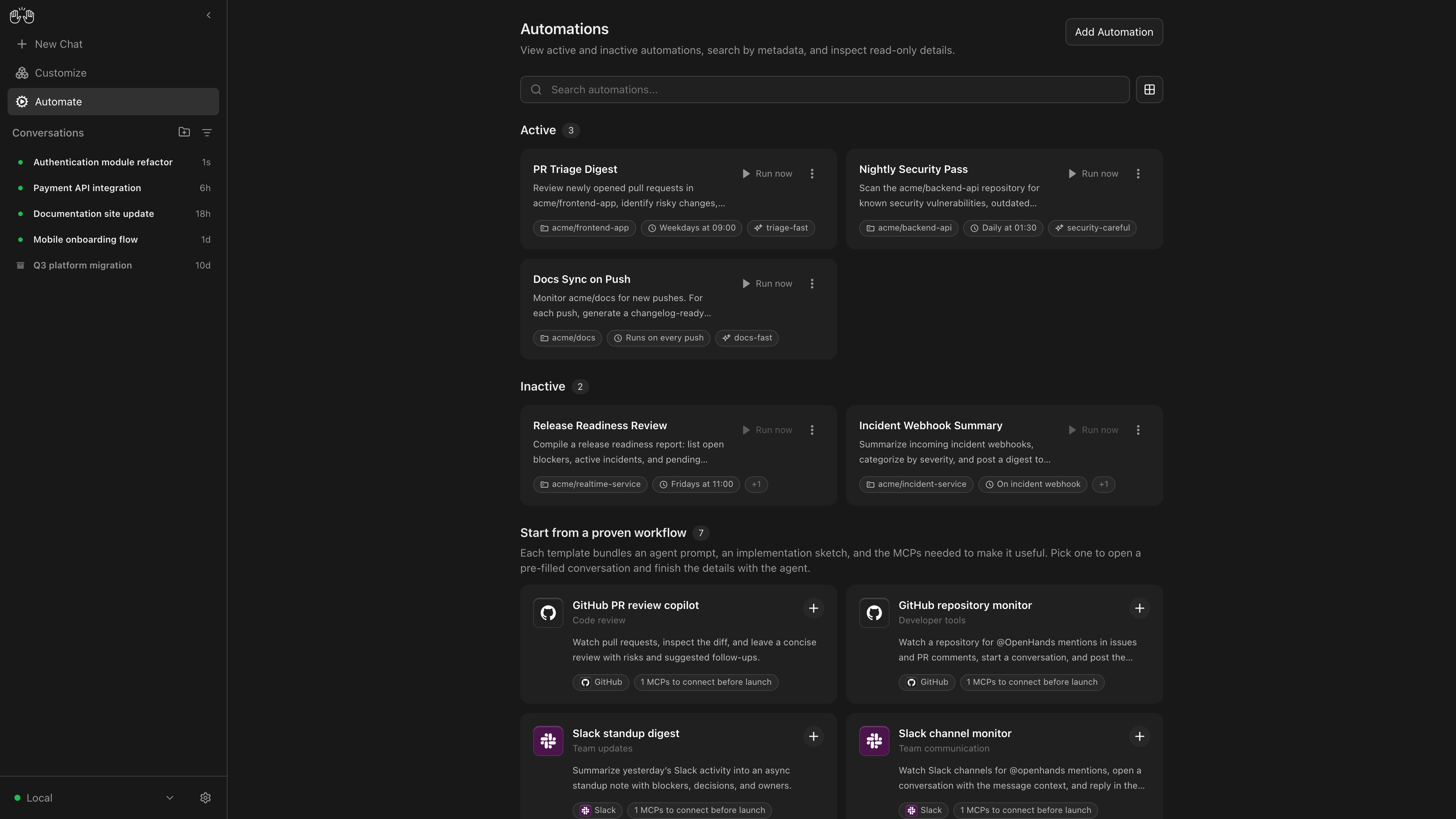
OpenHands Agent Canvas turns your coding agents into a self-hosted, always-on engineering team. It's a developer control center for starting conversations and automating everyday tasks — like generating reports that publish to Slack or automatically decomposing GitHub issues into tasks.
It runs locally on your machine by default, but can connect to multiple “agent backends”, e.g. running agents in Docker containers, on VMs, or within your company infrastructure. You can optionally choose to run agents on OpenHands Cloud or OpenHands Enterprise infrastructure.
Agent Canvas runs the open source OpenHands agent out-of-the-box, but can use any third-party agent like Claude Code and Codex.
| Self-host your way | Run agents locally, in Docker, on VMs, or anywhere you can run an agent server backend |
| Switch between different backends | Switch between local, remote, and cloud agents without losing focus |
| Create automations | Create automations and workflows that integrate with Slack, GitHub, Linear, and more. Run on a schedule or in response to webhook events |
| Integrate with the tools you use | Connect your automations with third-party services like Slack, GitHub, Notion, and more to automate workflows |
| Bring your own model | Use with any LLM |
| Use with any agent | Use with OpenHands, Claude Code, Codex, Gemini, or any agent with Agent-Client Protocol (ACP). |
If you have questions or feedback, please open a GitHub issue or join the #proj-agent-canvas channel in Slack.
Quickstart
You can install OpenHands to run agents on any machine: on your laptop, on a dedicated computer like a Mac Mini, or on a server in the cloud.
The most powerful way to run OpenHands is on a server in the cloud. This allows your agents to continue running even when your laptop is shut, and makes it easier to trigger your agents through third-party services like Slack, GitHub, and Datadog. See SELF_HOSTING.md for details, especially with respect to security hardening.
Notably, you can run the backend in multiple different environments, and switch between them from the same Agent Canvas frontend. E.g. you can share an Agent Server with your team for agents doing code review and dependency updates, then have your personal agents running on your laptop.
Option 1: Without a Sandbox
Warning
This runs the agent-server directly on the machine you're installing on — the agent will have full access to your filesystem!
Prerequisites: Node.js 22.12.x or later, uv
npm install -g @openhands/agent-canvas
agent-canvas
The agent-canvas command starts the full local stack by default. You can also split it when you want to run pieces separately:
agent-canvas --frontend-only  # static frontend + ingress only
agent-canvas --backend-only   # agent server + automation backend + ingress only
Option 2: With a Docker Sandbox
Prerequisites:
- Docker: Docker Desktop on macOS/Windows, or Docker Engine/Docker Desktop on Linux.
- A host directory for
PROJECTS_PATHcontaining the project folders you want the agent to access. Create it before starting the container.
macOS / Linux:
export PROJECTS_PATH="$HOME/projects"  # directory containing your project folders
mkdir -p "$PROJECTS_PATH" "$HOME/.openhands"

docker run -it --rm \
  -p 8000:8000 \
  -v "$HOME/.openhands:/home/openhands/.openhands" \
  -v "${PROJECTS_PATH}:/projects" \
  ghcr.io/openhands/agent-canvas:1.1.0
Windows (PowerShell / Windows Terminal): See README.windows.md for the equivalent commands.
The agent will be able to access any project under PROJECTS_PATH.
Option 3: From Source
Warning
This runs the agent-server directly on the machine you're installing on — the agent will have full access to your filesystem!
Prerequisites: Node.js 22.12.x or later, npm, uv (for running the agent server via uvx)
git clone https://github.com/OpenHands/agent-canvas.git
cd agent-canvas
npm install
npm run dev
Access the UI at http://localhost:8000. You can add additional backends directly from the UI.
Architecture
Agent Canvas is powered by the OpenHands Agent Server, a REST API for running multiple agents on a single machine. Each Agent Server runs on a single host/port; the Agent Canvas can connect to multiple Agent Servers and easily flip between them.
You can run an Agent Server anywhere:
- Directly on your laptop (be careful!)
- On a dedicated machine like a Mac Mini
- On a virtual machine in the cloud
- Inside OpenHands Cloud (our commercial offering)
The Agent Server is often paired with an Automation Server, which lets you set up agents that run on a schedule or in response to events.