 89d1d9905c
Fix link and tag errors in README.md and README-zh.md to ensure that file paths and tag names are consistent
📈 Stock Analysis Agent
简体中文 | English
Intelligent Stock Analysis Agent Based on 🦉OWL Framework





📖 Introduction
A stock analysis agent based on the 🦉OWL framework that provides users with comprehensive stock analysis reports, including basic stock information, technical indicators, risk metrics, and investment recommendations.
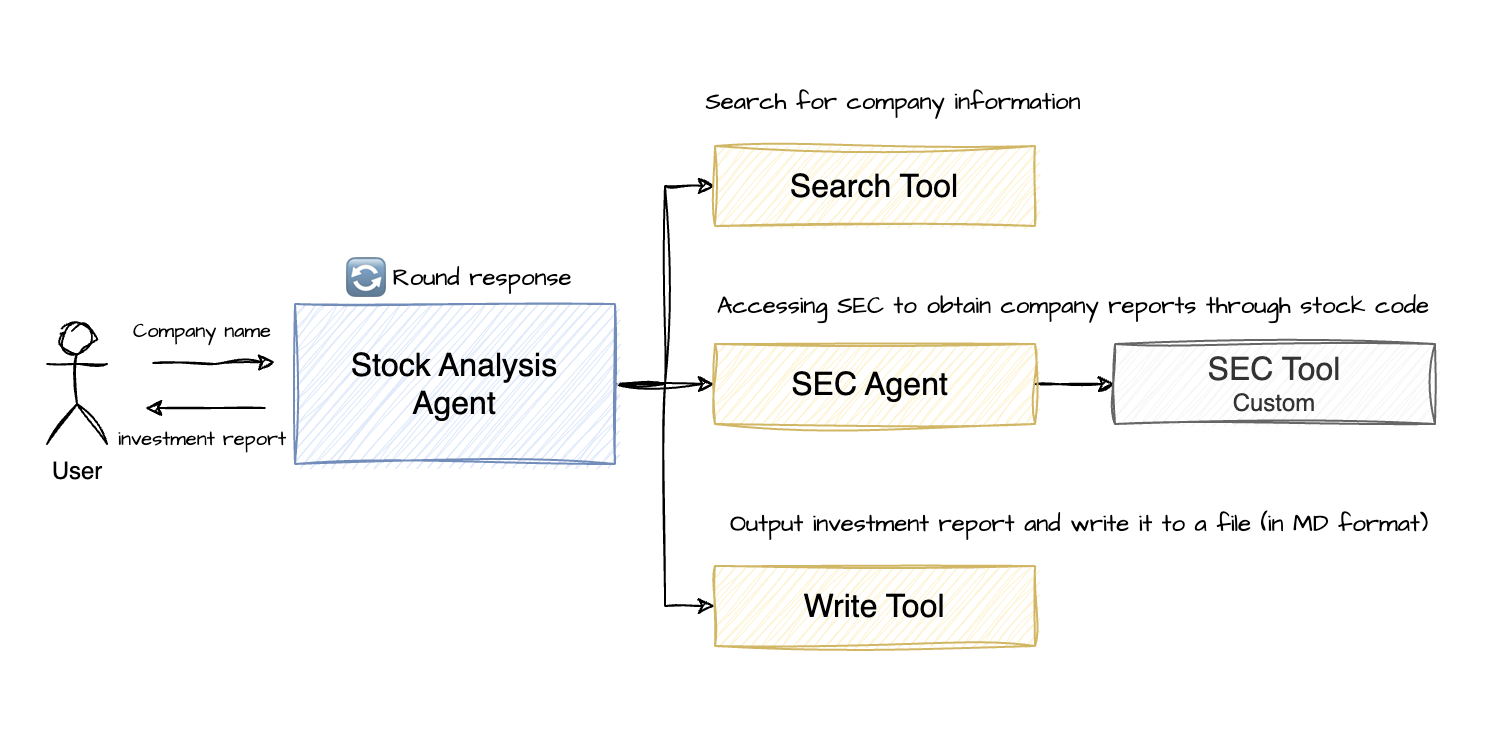
Stock Analysis Agent Architecture
- Stock Analysis Agent: Uses the RolePlaying Agent from the Camel-ai framework (same as OWL) as the main agent
- Stock Analysis Tools: Utilizes report search and SEC tools to collect company basic information, financial reports, and other data
- Search Tool: Uses search engines like Baidu (built-in tool in the Camel-ai framework)
- SEC Tool: Retrieves company basic information and financial statements. Note: Financial statements can be hundreds of thousands of words long, so it's recommended to summarize them before use to avoid high token costs
- SEC Agent: Uses a ChatAgent that automatically calls the SEC Tool to retrieve company financial data and generate summary reports based on the provided stock code. Free LLM models like Zhipu's GLM-4-Flash can be used here
- Report Write Tool: Uses a file editing tool to write complete company investment analysis reports to files
🚀 Quick Start
1. Install the OWL Framework
# Clone the GitHub repository
git clone https://github.com/camel-ai/owl.git

# Navigate to the project directory
cd owl

# If you haven't installed uv yet, install it first
pip install uv

# Create a virtual environment and install dependencies
# We support Python 3.10, 3.11, 3.12
uv venv .venv --python=3.10

# Activate the virtual environment
# For macOS/Linux
source .venv/bin/activate
# For Windows
.venv\Scripts\activate

# Install CAMEL and all its dependencies
uv pip install -e .

# Navigate to the Stock Analysis Agent directory
cd community_usecase/stock-analysis
2. Install Additional SEC Tools
# Install SEC tools
uv pip install sec-api
3. Configure Environment Variables
# Create .env file
touch .env
Add relevant API keys to the .env file (refer to the .env.example file)
# DeepSeek API (https://platform.deepseek.com/api_keys)
DEEPSEEK_API_KEY='Your_Key'
DEEPSEEK_API_BASE_URL="https://api.deepseek.com/v1"

# ZHIPU API (https://bigmodel.cn/usercenter/proj-mgmt/apikeys)
ZHIPUAI_API_KEY='Your_Key'
ZHIPUAI_API_BASE_URL="https://open.bigmodel.cn/api/paas/v4/"

# SEC-API (https://sec-api.io/profile)
SEC_API_API_KEY='Your_Key'

# AgentOps API (https://app.agentops.ai/settings/billing)
AGENTOPS_API_KEY= 'Your_Key'
Tip
The project uses DeepSeek as the main model for the Stock Analysis Agent and Zhipu's GLM-4-Flash as the model for the SEC Agent
4. Run Stock Analysis
- View run parameters
python run.py --h

usage: run.py [-h] [--company COMPANY] [--use-agentops] [--rounds ROUNDS]

Stock Analysis Agent

options:
  -h, --help         show this help message and exit
  --company COMPANY  Company name to analyze
  --use-agentops     Enable AgentOps tracking
  --rounds ROUNDS    Maximum conversation rounds
- Execute company stock investment analysis
python run.py --company Apple
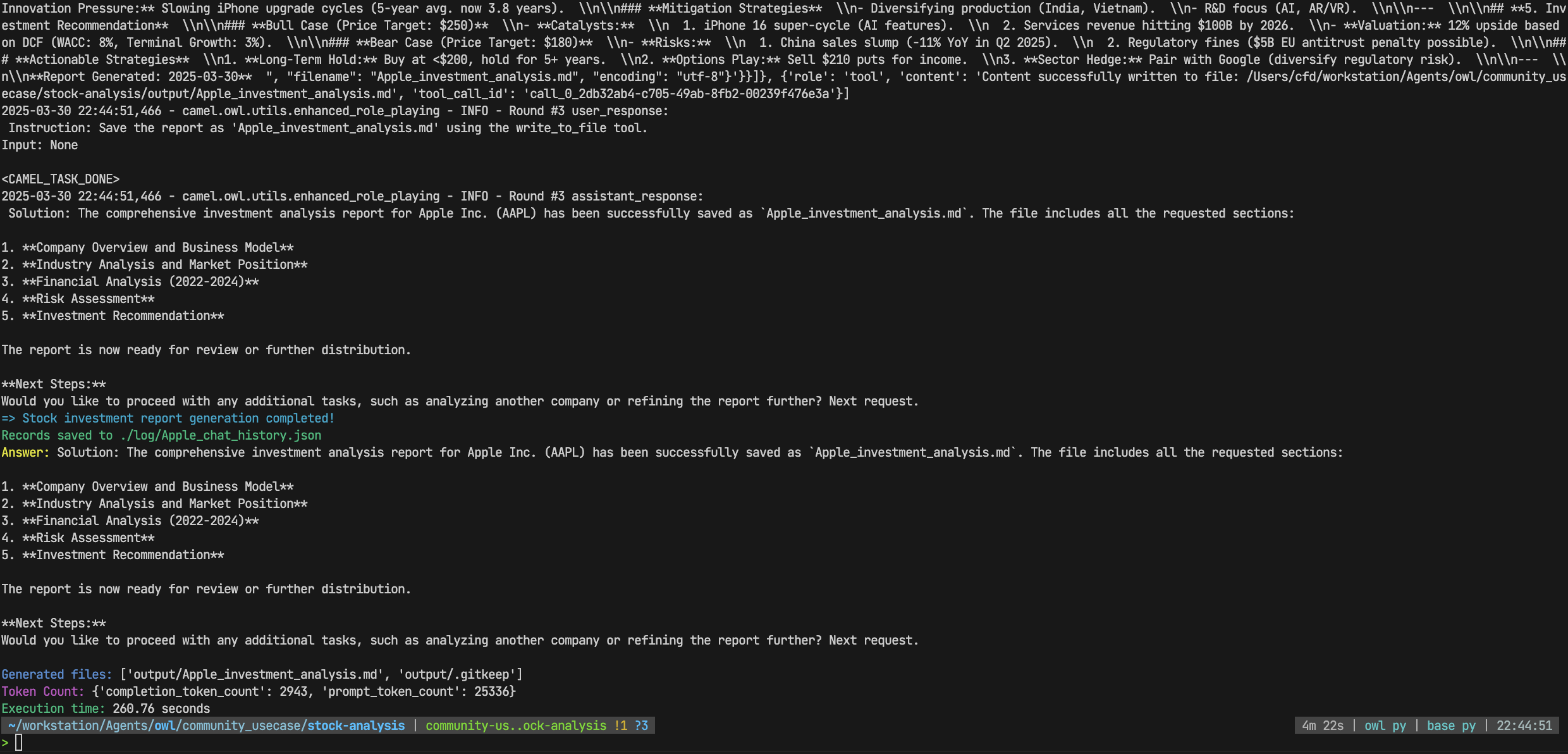
- View execution results
# ./log directory
Apple_chat_history.json # Records the entire execution process, including conversation history and tool call information
# ./output directory
Apple_analysis_report.md # Output investment analysis report
- View example runs
- Apple
- Alibaba
🥰 Getting Help
If you encounter issues while running the project, you can try the following methods:
- Check the error messages in the console output
- Submit an issue on the GitHub repository
📂 Project Structure
stock-analysis
├── agent
│   └── sec_agent.py    # SEC Agent
├── example
├── log                 # log directory
├── output              # Report output directory
├── prompts.py          # Prompt templates
├── run.py              # Main file
└── tools
    └── sec_tools.py    # SEC Tool
📝 License
This project is built on the CAMEL-AI OWL framework, which is licensed under the Apache License 2.0
🙏 Acknowledgements
- This project is built on the CAMEL-AI OWL framework
- Special thanks to the contributors of CAMEL-AI
Finding the Scaling Law of Agents: The First and the Best Multi-Agent Framework.